|
| Home > Administration > Administering Enhanced List Application |
|
 |
Configuring the Remote Server with translation data
|
The following SAT translations are used to setup remote extensions (for example, 60000) on the remote server.
Translation values are numbered to show the serial linkages between the various translations. Each SAT screen has values in bold face indicating that you need to provide values for the fields while configuring the remote server.
Establish coverage path for CM Messaging
To define the coverage path for CM Messaging:
1. Enter add coverage path 60.
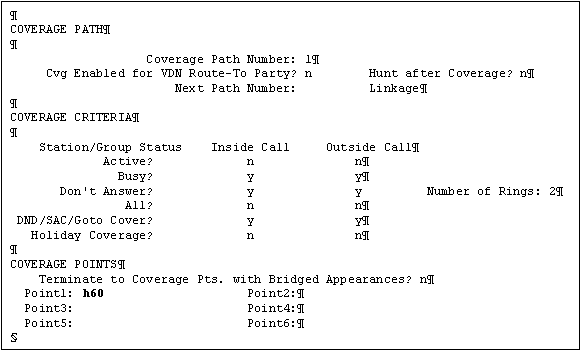
- Enter the coverage point 1 number
2. Enter add station 60000.
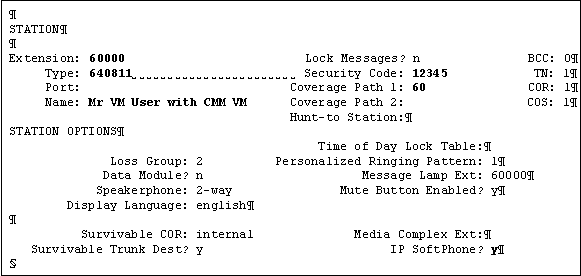
Enter a value for:
- Type
- Security Code
- Name
- Coverage Path 1
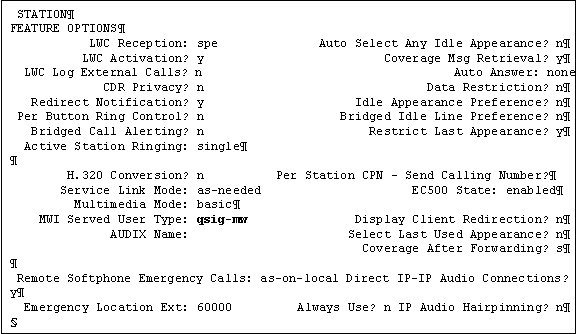
3. Press Esc+N to go to page 2.
4. On page 2, define the MWI Server User Type as qsig-mwi.
5. Enter add hunt-group 60.
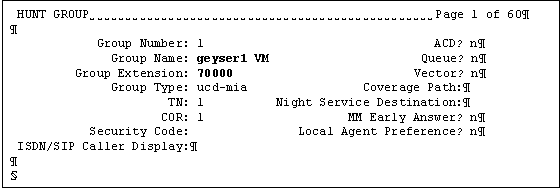
- Enter the Group Name
- Enter the Group Extension
6. Go to page 2.
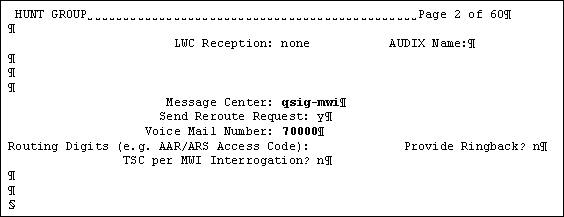
- Enter qsig-mwi as the Message Center.
- Enter the Voice Mail Number
Setup routing to Centralized Messaging Server
Observe the link between the translation values in this section.
1. Enter change dialplan analysis 7.
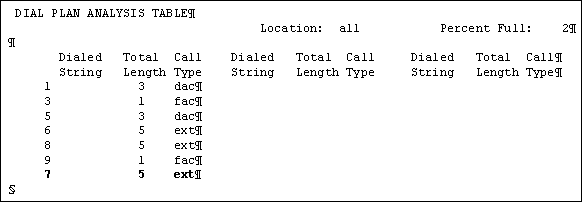
Enter a value for:
- dialed String
- Total Length
- Call Type
2. Enter change uniform-dialplan 7.
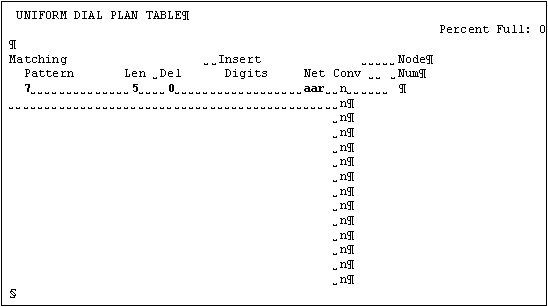
Enter a value for:
- Matching Pattern
- Len
- Del
- Net
3. Enter change aar analysis 7.
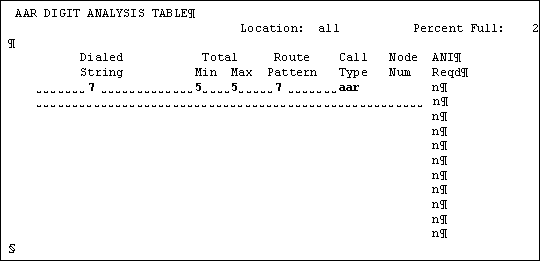
Enter a vaue for:
- Dialed String
- Total Min
- Total Max
- Route Pattern
- Call Type
4. Enter change route-pattern 7.
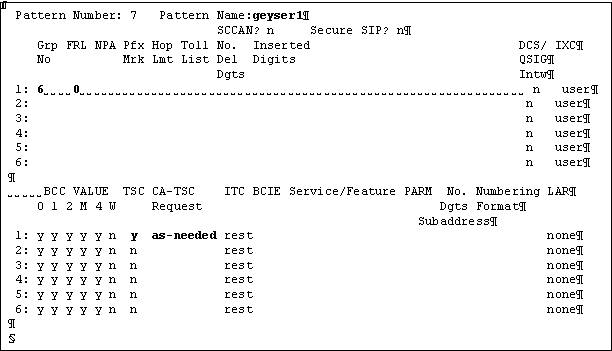
Enter a value for:
- Pattern Name field. The pattern name is the name of the remote server, in this example, the remote server name is geyser1.
- Grp No
- FRL
- TSC
- CA-TSC Request
Create tie trunk to the Centralized Messaging Server
1. Enter add trunk-group 6.
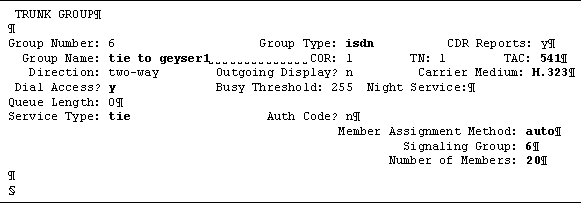
Enter a value for:
- Group Type
- Group Name
- TAC
- Carrier Medium
- Dial Access?
- Service Type
- Member Assignment Method
- Signaling Group
(Since the signaling group is not defined at this stage of configuration, you need to revisit this SAT screen and assign the signaling group after you create the signaling group)
- Number of Members
2. Go to page 2 of 21 of the trunk-group screens.
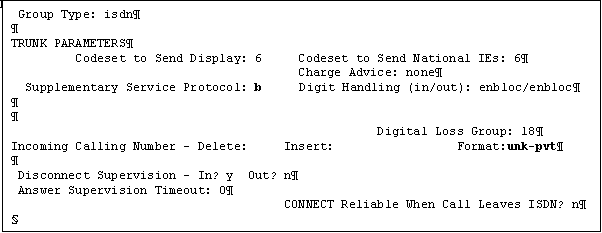
Enter a value for:
- Supplementary Service Protocol
- Format
3. Go to page 3 of 21 of the trunk-group screens.
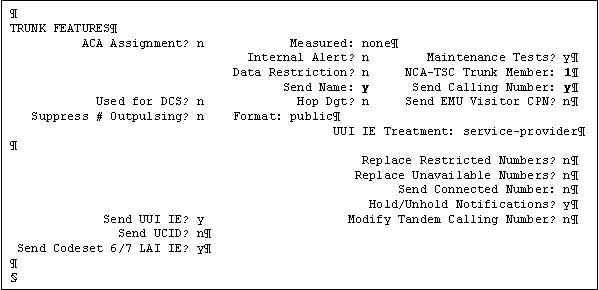
Enter a value for:
- NCA-TSC Trunk Member
- Send Name
- Send Calling Number
4. Enter change node-names ip.
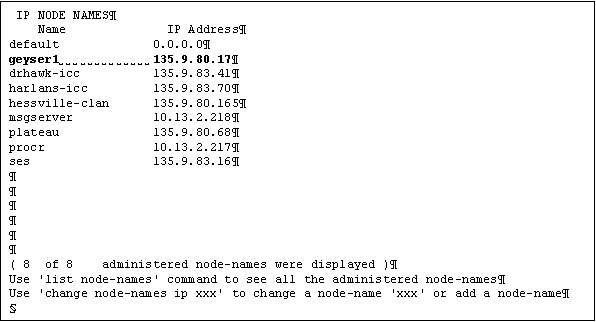
Enter a value for:
5. Enter add signaling-group 6.
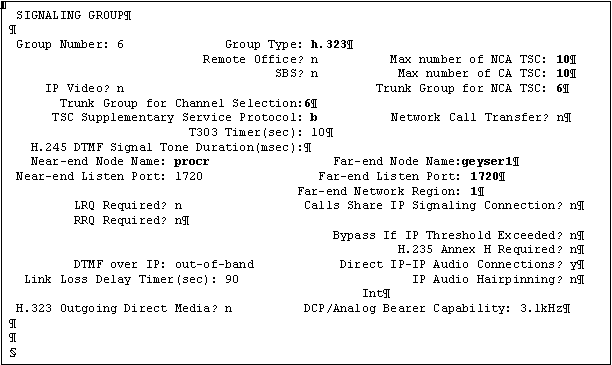
Enter a value for:
- Group Type
- Max number of NCA TSC
- Max number of CA TSC
- Trunk Group for NCA TSC
- Trunk Group for Channel Selection
- TSC Supplementary Service Protocol
- Near-end Node Name
- Far-end Node Name
- Far-end Listen Port
- Far-end Network Region
Setup calling party number for call answer, otherwise hear ext 00000
1. Enter change private-numbering 6.
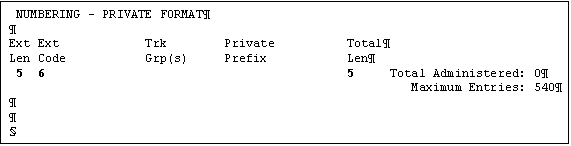
Enter a value for:
- Ext Len
- Ext Code
- Total Len
Setup calling party number for login to messaging with # (extension not entered)
1. Enter change public-unknown-numbering 6.
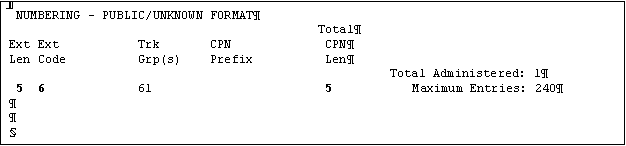
Enter a value for:
- Ext Len
- Ext Code
- Total CPN Len
Top of page
|







