|
| Home > Administration > Administering Enhanced List Application |
|
 |
Configuring the host server (Centralized Messaging Server)
|
This section contains tranlsation values required for configuring the host server.
Setup routing of Message Waiting Indicator back to the remote server
1. Enter change uniform-dialplan 4.
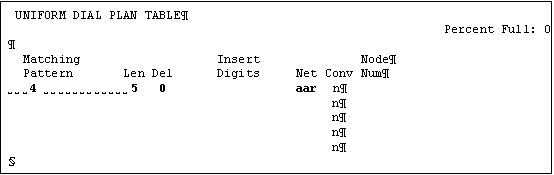
Enter a value for:
- Matching Pattern
- Len
- Del
- Net
2. Enter change aar analysis.
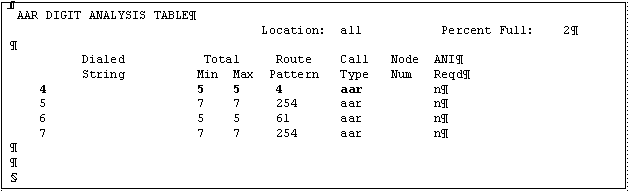
Enter a value for:
- Dialed String
- Total Min
- Total Max
- Route Pattern
- Call Type
3. Enter change route-pattern 4.
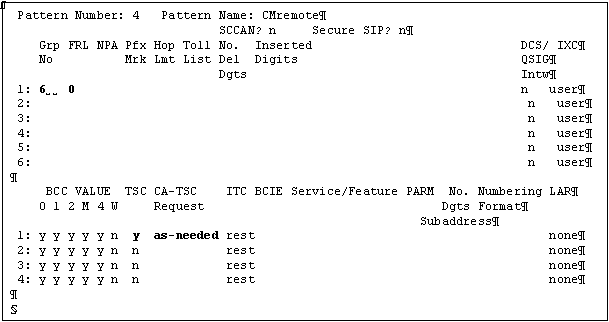
Enter a value for:
- Pattern Name
- Grp No
- FRL
- TSC
- CA-TSC Request
Create tie trunk to remote server
Observe the trunk-group number, and the signaling group number is the same number used when creating tie trunk to the host server.
1. Enter add trunk-group 6.
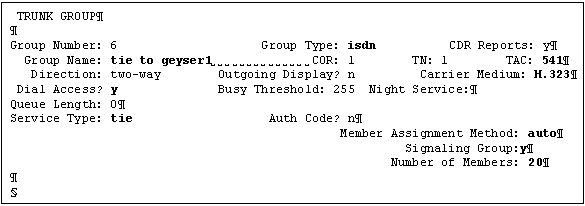
Change the values for the following fields:
- Group Type: isdn
- Group Name: tie to geyser1
- TAC: 541
- Carrier Medium: H.323
- Dial Access? y
- Service Type: tie
- Member Assignment Method: auto
- Signaling Group: 6
(Since the signaling group is not defined at this stage of configuration, you need to revisit this SAT screen and assign the signaling group after you create the signaling group)
- Number of Members: 20
2. Go to page 2 of 21 of the trunk-group screens.
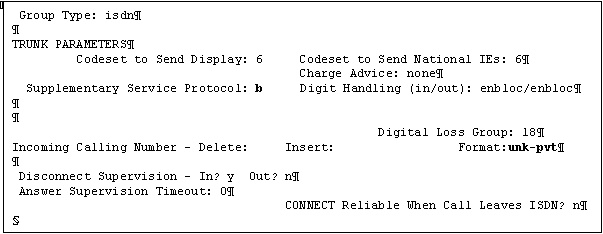
Enter a value for:
- Supplementary Service Protocol: b
- Format: unk-pvt
3. Go to page 3 of 21 of the trunk-group screens.
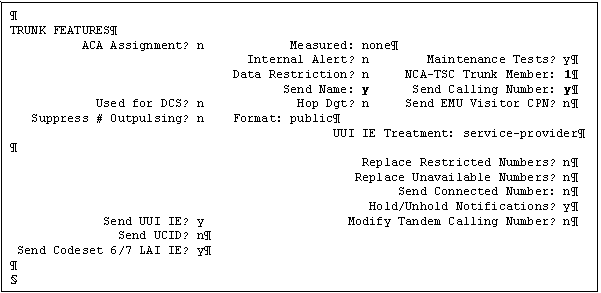
Enter a value for:
- NCA-TSC Trunk Member: 1
- Send Name: y
- Send Calling Number: y
4. Enter add signaling-group 6.
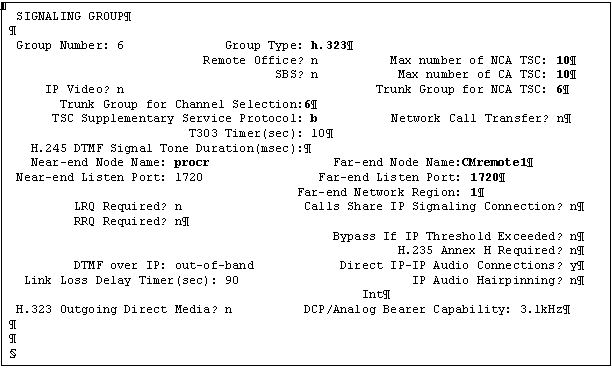
Enter a value for:
- Group Type
- Max number of NCA TSC
- Max number of CA TSC
- Trunk Group for NCA TSC
- Trunk Group for Channel Selection
- TSC Supplementary Service Protocol
- Near-end Node Name
- Far-end Node Name
- Far-end Listen Port
- Far-end Network Region
5. Enter change node-names ip.
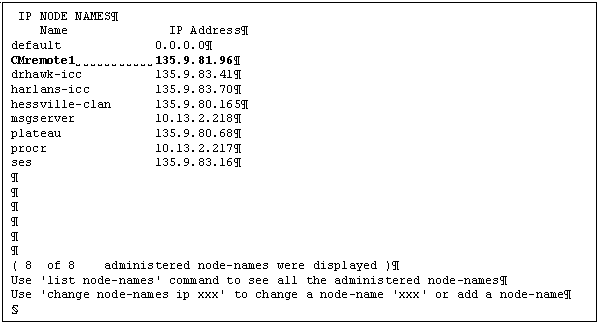
- Enter values for the Name: CMremote1 field.
- Enter values for the IP Address: 135.9.81.96 field.
Top of page
|







