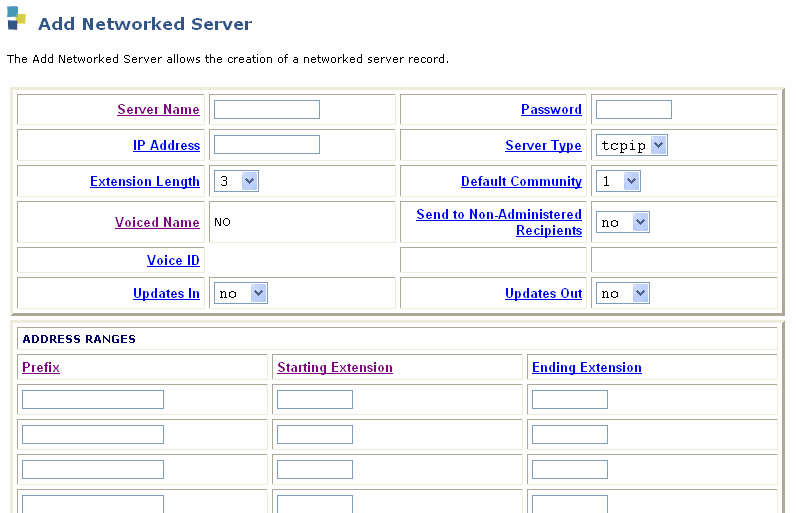
Table: Field Definitions: Add Networked Server page
|
Field |
Valid Input |
Description |
|
Server Name |
From 1 to 10 alphanumeric characters; can
include dashes or underscores |
Enter the name of the remote Communication Manager server.
If the system is another Communication Manager server, you can determine the
name on the
remote Communication Manager server by selecting TCP/IP Administration menu option
and then the Network Addressing window or web page.
|
|
|
tcpip=digital networking
ichg54=Interchange 5.4 or later; use tcpip for Interchange
pre-5.4
calld=Call delivery to non-administered number
|
Enter the type of machine you are creating or changing.
When creating or changing a remote machine for digital networking,
this field must be ichg54 for Interchange 5.4 or later
and tcpip for all others.
|
| IP Address
|
Four decimal numbers written in dotted format:
each number needs to be in the range 0 to 255. For example, 135.9.52.45. |
The IP address that is used when the messaging software connects to the remote machine
to establish a call for digital networking. |
| Password |
From 5 to 10 alphanumeric characters; can include dashes or underscores |
The password sent to the remote machine when establishing a connection. |
|
Updates:
In? |
yes
no |
Select yes if the local system accepts
updated database information from the remote system (the Updates
In field must also be set to yes on the local Machine
Profile screen).
Set to yes only after testing the network end
to end during initial administration. |
|
Updates:
Out? |
yes
no |
Select yes if the local system sends updated
database information to the remote system (the Updates
Out field must also be set to yes on the local Machine
Profile screen).
Set to yes only after testing the network end
to end during initial administration. |
|
Voiced Name? |
yes
no |
This field contains an no until you record
a name for the system. This field automatically changes to yes
when you record a name for the machine. |
|
Extension Length |
An integer from 3 to 10 |
Enter the length of extensions on the local system. The value you enter must match the extension length in your dial plan. |
|
Voice ID |
Display-only |
Displays a system-assigned identifier that you must use to identify the machine if you decide to record machine names. |
|
Default Community |
An integer from 1 to 15 |
If you have administered your system to use community sending restrictions, enter the default community number for your subscriber population. |
|
Prefix |
From 0 to 21 alphanumeric characters |
Enter the prefix digits. A user enters the prefix
before the remote subscriber's extension when addressing voice
messages. To simplify this task, use a short, descriptive prefix.
The total length of the prefix plus the extension must not exceed
24 characters. The system uses the prefix only to identify subscribers.
It is not used for dialing out, so it does not need to match an
area code or office code. The following are examples of possible
prefixes:
- No prefix. The prefix is required only
when one or more of the remote subscribers share the same extension
numbers as the local subscribers (the extension ranges of the two
systems overlap). If there are no overlapping extension numbers, a
prefix is not needed.
- Public network access code. When addressing
a message to a remote subscriber, the local subscriber enters the
remote subscriber's number as if placing a call to that subscriber.
- Location code. This method simplifies
addressing messages by requiring only an alphanumeric code in front
of the extension number. Location codes are shorter and often easier
to remember.
|
|
Start Extension |
A 3-digit to a 10-digit string |
Enter the starting extensions for the ranges
of telephone numbers used on the remote system. (to designate
a block of switch extensions for remote subscribers.)
For example, if the system uses extensions
between 2000 and 3000, enter 2000 in the Start
Ext. field.
Up to 10 different ranges can be specified
to pinpoint the exact set of extension blocks used by the remote
system. The length of the start and end extension must agree with
the Extension Length field. For a 5-digit extension,
the default is from 00000 to 99999. |
|
End Extension |
A 3-digit to10-digit string |
Enter the ending extensions for the ranges
of telephone numbers used on the remote system. (to designate
a block of switch extensions for remote subscribers.)
For example, if the system uses extensions
between 2000 and 3000, enter 3000 in the End Ext.
field. |
|
Warnings |
Display-only |
This field displays a warning when a duplication or overlap of an extension range for another machine is being assigned. |