Avaya Communication Manager Messaging
Home Getting StartedAdministrationMaintenanceReference

Search This CD

Index

Contact Us


Home > Administration > Email (Internet Messaging) > Email Administration > System Parameters Features Screen, Page 4

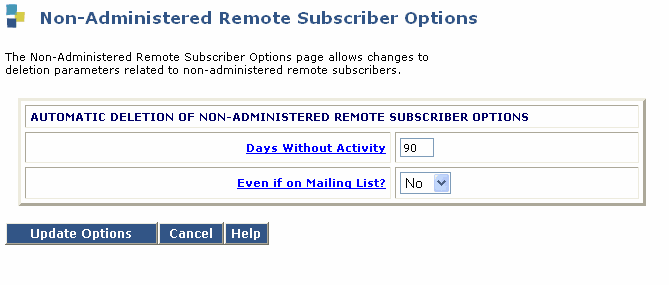
Non-Administered Remote Subscriber Options


Table: Field Definitions: Non-Administered Remote Subscriber Options
Field Name
Valid Input
Description/Procedure
Automatic Deletion of Non- administered Remote Subscriber Options:
Days without Activity
A number from 0 through 999

The number of days after which nonadministered remote subscribers are automatically removed if there is no send/receive activity between the remote subscriber and a messaging subscriber.

A value of 0 will turn off the automatic deletion of remote subscribers.

Automatic Deletion of Non- administered Remote Subscriber Options:
Even if on a Mailing List?
Yes
N o
Enter Yes to delete the remote subscriber from the system database after the administered number of days of inactivity.
Enter No in this field to except nonadministered remote subscribers who are on mailing lists from the automatic deletion.
Entering n tells the system to search through all messaging subscribers' mailing lists for a nonadministered remote subscriber address. If a nonadministered remote address is found on a mailing list, the system does not delete the address, even if there was no send/receive activity between the remote subscriber and messaging for the amount of time entered above.

Top of page

  Search This CD     Index     Contact Us
� 2002-2009 Avaya Inc. All rights reserved.