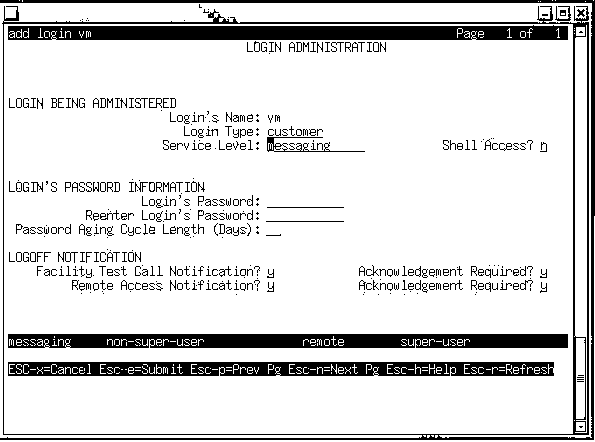
Table: Field Definitions: Login Administration
Screen, Page 1
|
Field Name
|
Valid Input
|
Description/Procedure
|
|
LOGIN BEING ADMINISTERED
|
|
Login's Name:
|
|
Determines whether the Call Transfer Out Of
AUDIX feature is active and what type of transfer is used:
- sa (system
administration)
- vm (voice messaging)
|
|
Login Type:
|
|
- Enter customer
if the login name is cust, sa, vm, or browser.
Enter services if the login is craft.
|
|
Service Level:
|
|
Enter messaging
if the login name is sa, vm, or browser.
|
| Shell Access |
|
- Enter n if the login name is cust, sa,
vm, or browser.
|
|
LOGIN'S PASSWORD INFORMATION
|
|
Login's Password
|
|
Enter the password to be used for the particular
login name.
|
|
Reenter Login's Password
|
- Up to 12 alphanumeric
characters.
|
Re-enter the password to be used for the particular login name.
|
|
Password Aging Cycle Length (days)
|
See description.
|
Enter the number of days (up to 90) that the
password is valid before it must be changed.
|
|
LOGOFF NOTIFICATION
|
| Facility Test Call Notification |
Leave the defaults. |
|
| Acknowledgement Required |
Leave the defaults |
|
| Remote Access Notification |
Leave the defaults |
|