TOC Index Search


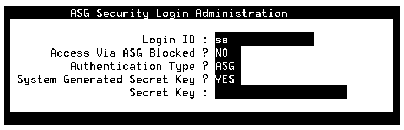
ASG Security Login Administration Window


Table: Field Definitions: ASG Security Login Administration Window
Field Name
Valid Entries
Description/Procedure
Login ID:
sa or vm
The Intuity AUDIX login user name of all those who will administer the Intuity AUDIX system.
Access Via ASG Blocked?
y=yes
n=no
Y indicates that you want to temporarily disable this login ID. For example, if a user will be on vacation or travel for a long period of time, you can block access until he returns. N indicates that the login ID has full access privileges.
Authentication Type?
ASG
UNIX
ASG indicates that the user must have the ASG Key to produce the unique response number during login.
UNIX indicates that the user can log in to the system with the normal UNIX password. The login process for a dial-up user will be the same as a local session.
System Generated Secret?
y=yes
n=no
blank
Y indicates that you want the system to create the secret key for this login ID. N indicates you will provide the secret key number in the next field.
If you typed UNIX in the Authentication Type? field, leave the System Generated Secret? field blank.
Secret Key:
20-digit string, using only the digits 0 through 7 in any order
If you typed N in the System Generated Secret? field, provide a 20-digit secret key for this login. If you typed Y in the System Generated Secret? field, leave the Secret Key: field blank.
If you typed UNIX in the Authentication Type? field, leave the Secret Key: field blank.

Note: The Secret Key number is not the challenge response number that is needed to access the system. The ASG hand-held device generates the challenge response number at the time of login.


Avaya Communication
http://www.avaya.com
Avaya UCS Information Development
TOC Index Search