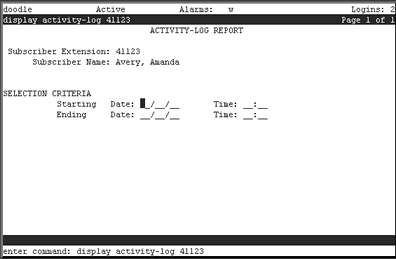
Table: Field Definitions: Activity-Log Report Screen
|
Field Name |
Valid Input |
Description/Procedure |
|
Subscriber Extension: |
Display only |
The subscriber telephone extension you entered on the command line when you generated the report. |
|
Subscriber Name: |
Display only |
The subscriber name that corresponds to the extension you entered on the command line when you generated the report. |
|
SELECTION CRITERIA |
|
Starting Date: |
Blank Date (mm/dd/yy) |
The calendar date the report begins. If you leave this field blank, the earliest available date for this subscriber displays. |
|
Starting Time: |
Blank Time (hh:mm) |
The 24-hour time the report begins. If you did not specify a starting date, you must leave this field blank. |
|
Ending Date: |
Blank Date (mm/dd/yy) |
The calendar date the report ends. If you leave this field blank, you must also leave the time field blank. |
|
Ending Time: |
Blank Time (hh:mm) |
The 24-hour time the report ends. If you did not specify a starting date, you must leave this field blank. |