Click the  icon or choose File | Save.
|
IP Office 3.0 Manager |
|
Manager 3.0 tracks the changes made to the configuration so that if all the changes made can be merged, then the option for merging (Merge Config) will automatically be selected and if a reboot is required, When Free will be selected. Although a reboot only takes a few seconds, it cuts off any calls in progress. To avoid upsetting users, select the Reboot When Free option.
If you are working with a configuration received from the Control Unit, do the following to save the configuration:
Click the icon or choose File | Save.
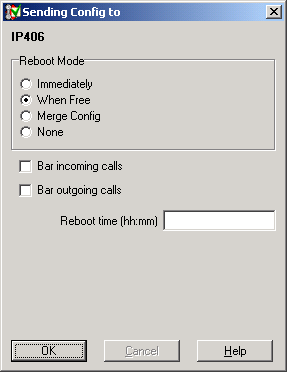
The save action required is automatically selected based on changes made to the configuration. If a reboot option is selected by the system, then you MUST perform a reboot for the configuration changes to be reflected. If Merge Config is selected by the system, you can override this selection and perform a reboot if you desire. The options available are:
Immediately - Reboots the Control Unit immediately and will cut off any calls in progress.
When Free - Reboots the Control Unit when the system is free (no calls in progress). The following options are only available with When Free selection:
Bar Incoming Calls: When selected, this option is checked with the When Free option and the System will bar all new incoming calls until after the reboot
Bar Outgoing Calls: When selected, this option is checked with the When Free option and the System prevents all new outgoing calls until after the reboot
Reboot Time (hh:mm): The system waits until this time before attempting to reboot. The instruction is stored in the Control Unit not in the Manager.
Merge Config - This option allows new features to be made active without rebooting the Control Unit, but only certain configuration changes can be merged.
None - Does not send any configuration to the Control Unit.
If you did not enter a system password when you received the configuration, then a password MUST be entered at this point to send the configuration to the Control Unit.
Select OK.