|
IP Office 3.0 Product Description |
|
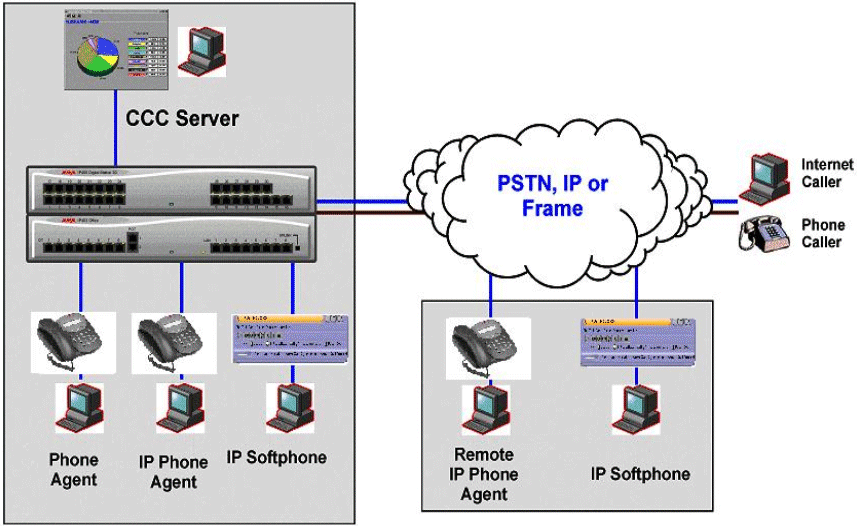
IP Office Compact Contact Center is a highly modular contact center solution catering for all contact center sizes from 2 to 75 agents. The following modules are available as part of the CCC software application:
Compact
Call Center (CCC) Server - Base System (IPO CCC SVR RFA)
Provides one supervisor position, with real-time information view,
management by exception, plus historical reports for any aspect of the
contact center. Up to 73 standard reports can viewed or printed. Also
included are reporting capabilities for 5 agents and one license for a
PC Wallboard (PCWB) application.
Agent & Site Management (Real Time)
Real
Time Supervisor Monitoring (Call Center View � CCV)
As many as 21 supervisor positions (CCV) can be purchased in total
for CCC (please note: MSDE installations can only be supported up to 5
supervisor positions). This provides a supervisor with the ability to
monitor in real time the service being provided to callers. There are
up to 12 separate real-time graphs that can be viewed by the supervisor.
Alarms also appear in real time forcing the supervisor to acknowledge
them as they occur.
Phone
Manger Pro: Agent Enabled
Provides agents with a PC CTI application where they can log in,
join groups, and go into busy status when they are away from their desks
for short periods. Provides a lower cost of ownership as proprietary handsets
are not required. For IP users, Phone Manager PC Softphone can be used
in agent mode as well, without the use of a handset. Please refer to the
applications section for more information on Phone Manager Pro.
Alarm
Reporter
Alarm Reporter has been designed to enhance the exception management
used by Call Center View (CCV). The Alarm Reporter enables the contact
center supervisor to look back on the performance of the contact center,
on a daily or weekly basis, by reporting on certain criteria predefined
by the contact center supervisor.
Historical
Reporting
The Compact Contact Center archives all call center interactions (telephony
or multimedia) to a central database (MSDE or SQL). This provides a rich
set of standard reports to the business, and the capability to create
custom reports.
CCC
Reporter
The system can allow up to 20 separate Report Viewers within the
contact center (for MSDE installations, up to 5 viewers are supported).
Access to the standard reports is a thin client (new for version 5) application
based on Crystal Reports. Up to 73 standard reports are available, with
the ability to create up to 3 custom reports out of the box! (Requires
additional software, see Custom reports below). Reports can also be exported
to a variety of formats, including Excel, CSV, HTML, and PDF.
Report
Scheduler
All historical reports created within CCC can be scheduled for
individual delivery to anyone via email. Reports can also be scheduled
to multiple network printers.
Custom
Reports (new for CCC V5)
Starting with Compact Contact Center version 5, all reports are
Crystal Reports� based. This provides a much richer experience for the
small to mid-market customer, and creates an environment where custom
reporting is made more accessible. To create more than 3 custom reports
requires the designer license (IPO CCC DESIGNER RFA) AND a compatible
version of Crystal Reporting software (Crystal version 9).
Microsoft
CRM� Integrated Reporting
As part of Avaya�s continuing relationship with Microsoft Business
Solutions with the creation of the IP Office Customer Management solution,
Compact Contact Center version 5 will provide a selection of reports that
integrate the information between the two systems. IP Office Customer
Management is the combination of Avaya
IP Office CCC and Microsoft CRM to integrate all contact points within
a business in such a way that will transform it.
MultiMedia
Module (MMM)
The MultiMedia Module (MMM) provides CCC with new routing schemes.
It will also provide combined reporting for all interactions within the
contact center. IP Office ensures that an organization can implement and
measure a service level agreement against all aspects of the customer
contact process � for example ensuring that all emails receive a reply
within half an hour of them being sent. There are several queue types
supported in the MMM; they are:
Email
Queues
A multimedia agent would receive emails from the queue and reply
via MS-Outlook� client interface. Emails queuing can be supported on POP3
or MS-Exchange� servers.
Chat
Queues
Utilizes the Microsoft Chat� interface to route requests for real-time
chat between a customer and agent, providing that much needed response,
in real time, for your online customers.
Web
Callback
For those online customers wanting a real person to speak to instead
of a chat session, web callback enables them to leave their callback number,
once that is sent to an agent, the system can automatically call back
the customer, providing a savings in time and better customer satisfaction,
with increased efficiency.
Proactive
List Dialing (Preview Dialing)
Import your direct marketing lists to Excel based datasheets and
the Proactive List will create an outbound campaign for your agents. Agents
can accept particular contacts (if desired) or have automatic acceptance.
Result codes can determine if the call was successful or if it needs to
be placed back in the queue for rescheduling.
Wallboards
Fixed
Wallboards
Fixed scrolling wallboards enable key statistics and messages to
be displayed for everyone in the call center to see. Supervisors can send
ad-hoc messages to wallboards to broadcast important information, or to
make announcements.
PC
Wallboards
PC-based wallboards allow individual agents to see their own individual
statistics, those for their group, or for the whole contact center. Agents
can customize their view so that information is presented in the way most
useful to them. In additional, supervisors can set particular messages
to appear on PC Wallboards, as a motivational or informational tool. Please
refer to the CCC System Administration manual for a complete list of variables
available.
3rd Party Integration
Workforce
Management Interface
Compact Contact Center works with a number of workforce rostering
packages, including Blue Pumpkin and Qmax. This module enables the interoperability
of these packages with CCC.
Microsoft�
TAPI Integration
By utilizing either the 1st party or 3rd party TAPI support on
IP Office, you are enabling your business to speak to a wide range of
supported software packages (e.g. ACT! Goldmine) that increase the productivity
of your agents and the profitability of your contact center.