Access the Delta Server using Start | Programs | CCC | Delta Server.
In the left-hand panel
click SMDR.
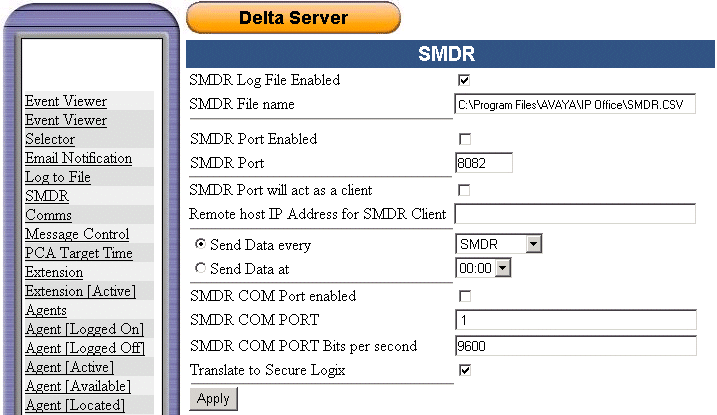
Configure the SMDR logging options as required:
SMDR Log File Enabled
Selecting this option enables the logging of SMDR records to a CSV format text file.SMDR File Name
Set the file name and location. At midnight, the log file is automatically renamed by appending the date and a new log file started. The current days log file can be accessed by other applications but only as a read-only file.SMDR Port Enabled
Selecting this option enables an listening IP port on the Delta Server PC which can be polled by third-party applications to access SMDR records.SMDR Port
Sets the port number used for SMDR Port Enabled above or SMDR Port will act as a client below.SMDR Port will act as a client
Selecting this option enables the Delta Server as a client sending SMDR records to the IP address and port specified.Remote host IP Address for SMDR client
Enter the IP Address of the remote host for the SMDR Client.Send Data every
This option applies to SMDR Port Enabled and SMDR Port will act as a client if selected. The Delta Server will then send records at the selected frequency. The options are to send every individual SMDR record or record sets every 10, 25, 50 or 100 records.Send Data at
This option applies to SMDR Port Enabled and SMDR Port will act as a client if selected. The Delta Server will send all SMDR records collected as a set at the time selected.SMDR Com Port Enabled
Selecting this option enables the Delta Server to send SMDR records as they occur to a specified PC serial (COM) port.SMDR COM Port
Specifies the PC serial (COM) port to use.SMDR COM Port Bits per Second
Specifies the port speed for the select serial (COM) port.Translate to Secure Logix
If selected, changes the fields of the SMDR record output to the SMDR port, see SMDR Output Fields.