| Coverage Path |
Administer a coverage path for both phone demonstration and normal operations. Use the Coverage Path form and give it a number, for example, Coverage path 1. If Voice Mail is available, this is also where you administer the hunt group or VDN, depending on the type of VM system being used. |
| Enhanced Conference Features |
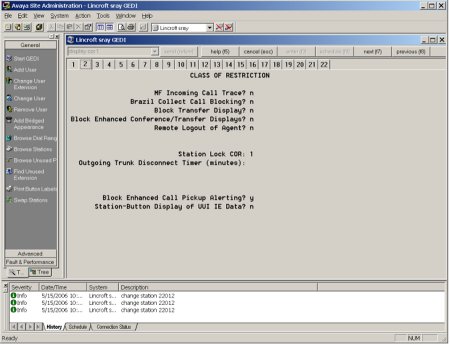
Enable enhanced conference display to support the user experience for conferences. Block Enhanced Conference Display on the Class of Restriction (COR) form must be set to No. Use the command Change COR, followed by a number, to view the form and make the change. a sample of the Class of Restriction form. |
| Wideband Audio |
To enable Wideband Audio, use the Change IP codec: command on CM. Ensure that G.722-64K is first on the list of codecs. Note that wide band audio works only for direct-IP calls between two 96xx endpoints, either with both registered to the same server, or registered to different servers when connected by IP trunks. Calls between two 96xx phones connected by an IP trunk do not currently support wide band audio when the call is shuffled such that the media travels directly between the two 96xx IP telephones. Calls involving three or more parties, even if they are all 96xx IP telephones, will not use wide band. Calls between two 96xx IP telephones where audio is terminated at a port network/gateway (PN/GW) media resource will not use wideband. Ensure that G.722 is added to all codec-sets that can possibly be used between all regions on the IP-Network Regions form where 96xx IP telephones exist. Technically, G722 does not need to be first. What is needed, however, is that all the non media processor-supported codecs (G722, SIREN, etc.) be placed before the media processor-supported codecs (G711, G729, G726, G723). |