

|
|
|
The G700 Media Gateway can accommodate any of the Avaya Data Expansion Modules. With Expansion Modules, customers can add additional LAN and WAN access modules directly to the Avaya G700 Media Gateway.
Figure 3. AvayaTM Expansion Module (example).
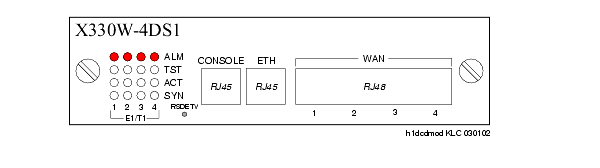
Two Avaya expansion modules that the customer may purchase are:
Customers with multiple branch offices need network solutions that are simple, flexible, and scalable. These customers may purchase the Avaya X330 WAN Access Routing Module as part of their configuration. This WAN Access Module provides WAN routing to the P330. The Avaya X330 WAN Access Routing Module can be managed by three methods:
The Avaya X330 WAN Access Routing Module provides WAN access that can be used with external firewalls or VPN Gateways.
Another Data Expansion that customers might purchase as part of their network is the Avaya P330 LAN Expansion Module. Features of this Data Expansion Module include:
CAUTION: Avaya Expansion Modules and Octaplane Stacking Modules are not hot-swappable. The G700 Media Gateway must be turned off before you remove or insert an Expansion Module. If there is an S8300 present that is also turned on, the S8300 should be shut down first, by pressing the Shutdown button until the OK to Remove LED shows a steady light.
|
|
|