S8700 IP Connect duplex configuration

Ethernet connections for a typical Avaya S8700 Media Server for IP-Connect
configuration are described below.
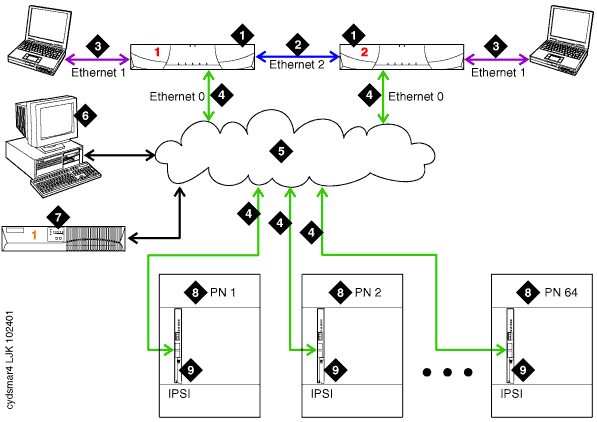
- Avaya S8700 Media Server.
The server performs system initialization and recovery, provides
access to the telephony application software, and handles alarming for
hardware and software components. Two servers are always present. One
server is active and the other server is on standby.
- Duplication interface: default Ethernet 2.
The dedicated, direct Ethernet connection between the two required
Avaya media servers. This connection is used to monitor and exchange the
health status of each server.
- Services interface: default Ethernet 1.
The dedicated Ethernet connection from the server to a laptop.
- Network control A and corporate LAN interface: default
Ethernet 0. The Ethernet connection
from the server to the port networks and the customer's LAN. In most S8700
IP-Connect
configurations, the control signals for the port networks are sent over
the corporate LAN (a "shared" or non-dedicated network). They
may be routed through various Ethernet switches or routers, depending
on the local network configuration.
- The S8700 IP Connect interacts with the corporate
network in this configuration, the IP addresses of the various S8700 media
server configuration components must be administered with extreme care
to prevent conflicts with other equipment that shares the LAN.
- The administrator's PC, the servers' Uninterruptable
Power Supplies, and the corporate network management system for SNMP alarms
(if used) access the server through this same Ethernet interface.
- Corporate LAN.
The topology for the local area network varies significantly.
|

|
The IP-connect configuration may be set up to send its
control signals over a private LAN. The configuration in this case looks
identical to that of a S8700 Multi-Connect
duplex configuration, except for the port network configuration (see
items 8 and 9 below). |
|
|
If Ethernet switches are part of the switch configuration
and report alarms to the servers using SNMP, they must be on the same
subnet as the S8700 media servers. |
- Administration PC. The administrator typically accesses
the media servers over the corporate LAN.
- UPS. An uninterruptible
power supply keeps the S8700 media server configurations functional through
brief power outages. One UPS is required per server.
The UPS units must be on the same subnet
as the S8700 media servers, and must report alarms using SNMP to their
respective servers, in order for the servers to respond correctly to a
loss of power.
- Port network (PN). Provides the telecommunications functions
of the system. An S8700 IP-Connect
configuration supports up to 64 port networks. The port networks must be Avaya G600 media gateways,
and each port network must contain
an IPSI circuit
pack.
- IPSI. The
Internet Protocol Server Interface (IPSI) circuit pack carries the control
network signals to the other boards in the port network.
- The IP addresses for the IPSI boards must be assigned
manually through a direct laptop connection to the IPSI board. This connection
is similar to the services link connection, requiring a crossover Ethernet
cable between the laptop and the IPSI board.
- The Ethernet connection characteristics for each
IPSI can be set automatically by the Ethernet switch (the autosense
option), or manually.
- Manual settings include the Ethernet connection speed
(10 Mbps or
100 Mbps) and
either half duplex (can receive or
transmit) or full duplex (can receive and
transmit simultaneously) operation.
- Normally Ethernet interfaces in the Avaya media server
network run at 100 Mbps
full duplex, but these values can be adjusted if equipment in the corporate
network requires it.