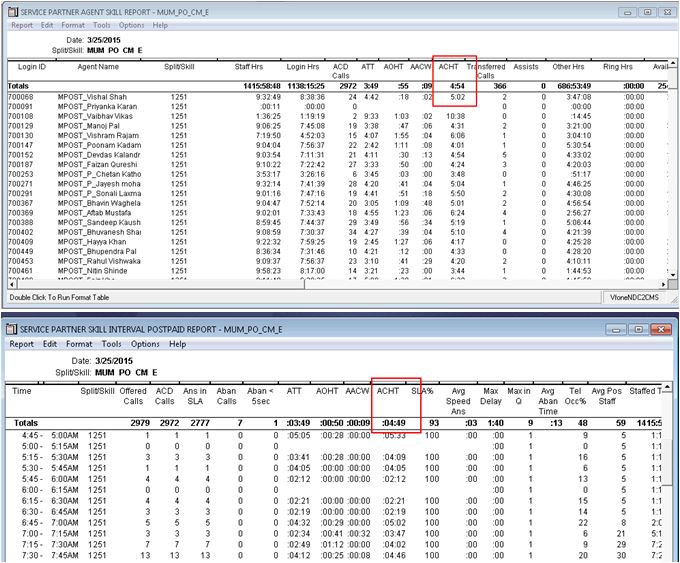
CMS: There is ACHT formula mismatch in the two designer reports and it is happening on particular skills only


Doc ID    SOLN268938
Version:    4.0
Status:    Published
Published date:    24 May 2015
Created Date:    21 May 2015
Author:   
Dody Peribadi ST
 

Details

All CMS version and designer reports

The ACHT (Average Call Handling Time) customized formula is showing mismatch in two Designer Reports, which is not happening for all skills. It's happening for particular Skills. Customer need to understand why this issue is occurring on their CMS and is this problem within the CMS?

Problem Clarification


Customer was designing the ACHT formula that used in two designer Skill reports, Split/Skill Daily and Split/Skill Interval reports. Following is the same formula used in the two different designer reports,
 
ACHT= (ACDTIME + HOLDTIME + ACWTIME) / ACDCALLS 
 
And customer wants to know in depth why the ACHT mismatch issue is not happening for all Splits/ Skills while comparing the two designer reports. And customer confirm all the Skills or CM hunt-group are configured the same.
 
Following is the detail of the issue as reported on the SR


Cause


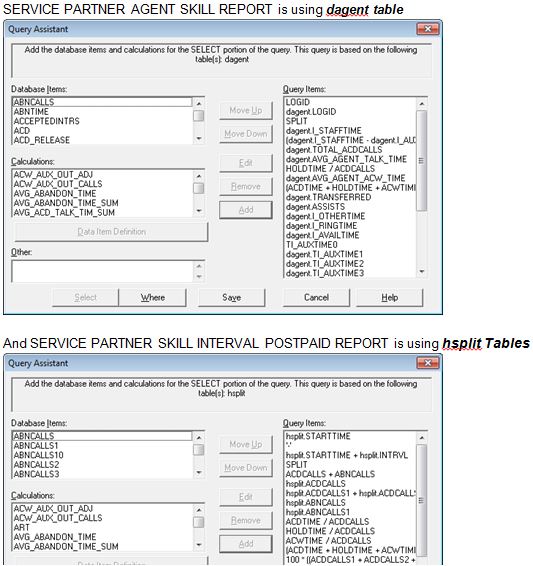
Lack of customer knowledge in customizing reports and the Database Items & Calculations used on CMS. Customer did not know when start customizing the ACHT formula in the two diffrent designer reports, there are actually using the different tables. And the difference of this ACHT formula is on HOLDTIME only. In this case the dagent.HOLDTIME is not the same as hsplit.HOLDTIME and then this is causing the issue.
 
Here is the guidance how to check the formula and the table used in the designer reports: Go to CMS Supervisor Menu --> Commands - Reports --> Real Time or Historical --> Designer and select the reports --> click on Edit button --> Edit tab & click on Queries... --> Select Queries Data or Totals and then Edit --> check inside the Query Assistant and you may find the words like "SELECT... The query is based on the following table[s]: dagent or hsplit" as shown below,


Solution


Per CMS Database Items & Calculations guide, HOLDTIME for agent tables includes HOLDTIME (as it does for split tables) AND HOLDACDTIME (which is the length of time that a split/skill and direct agent ACD calls spend on hold at agent’s telephone). So direct agent ACD calls explains why sometimes those reports are matching and sometimes they are not. This is working as designed.
Note:  Backbone engineer do not support any customization on CMS. Customer/ BP must approach the one who created the designer reports and reviewing the result of the reports.
*CMS Custom/ Designer reports must be validated by Provisioning/ APS Team. When developing designer/ custom reports, the developers constantly performance tested the new reports to see how they ran. They could not just create them and put them out there for any to use. Customers need to use the same approach when creating these custom reports. Before putting them out there, they need to be performance tested. Hence, always engage APS team to work with customer/ BP to customize any CMS reports and to ensure all the reports are passed the quality & performance test (bugs/ error free)




Avaya -- Proprietary. Use pursuant to the terms of your signed agreement or Avaya policy