

|
|
|
Next, we need to associate the three USTAT modules with the USTAT interface we configured earlier.
Enter the interface command to change to configuration mode for the USTAT interface. Then enter the module command once for each of the three modules that will operate from this interface:
interface fastethernet 0/2

module ustat provider_1

module ustat provider_2

module ustat provider_3

end
The interface configuration block which you configured earlier should now look like this:
interface FastEthernet 0/2

 description “USTAT Modules”

 ip address 172.16.6.6 255.255.255.224

 module ustat provider_1

 module ustat provider_2

 module ustat provider_3

 end
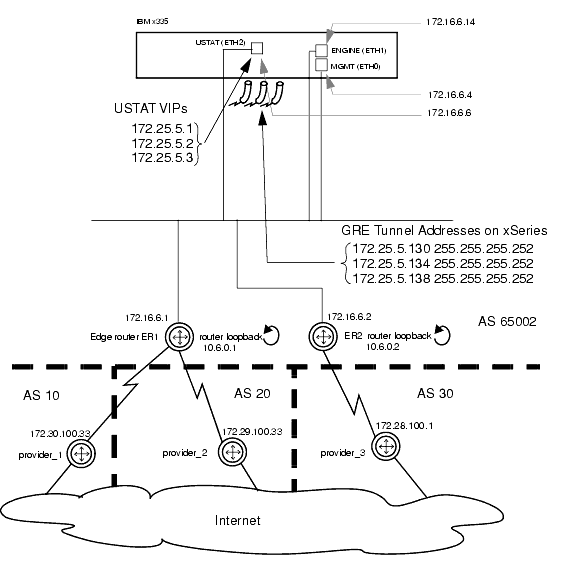
The xSeries device now has a basic configuration which will allow it to peer with your edge routers and begin evaluating traffic (though it does not yet have a source of measurement data).
Figure 7 depicts your xSeries’s configuration at this stage:
Figure 7: Ethernet, VIPs and USTAT GRE Tunnels configured
The next step is to configure your edge routers to peer with the xSeries device. See Chapter 2: Configuring Your Routers in the CNA Advanced Monitoring Guide.
|
|
|