

|
|
|
While still in config-engine mode, enter the bgp command, with your network’s AS number as the as-num argument:
bgp 65002
In addition to adding bgp 65002 to your running configuration, entering the bgp command also places the CLI in config-engine-bgp mode.
Enter the neighbor link command once for each of your links. The command takes address and name arguments, in the following form:
neighbor <address> link <name>
The address argument should be an IP address of an interface on the edge router that connects your network to the service provider identified by the name argument.
For this example, assume you have two edge routers. One of them connects your network to the service providers you have called provider_1 and provider_2 in the xSeries configuration, and the other edge router connects your network to the service provider you have configured as provider_3.
The interface you use to connect to the first router has the address 172.16.6.1 and your access interface on the second router is 172.16.6.2.
Your BGP neighbor commands should look like the following:
neighbor 172.16.6.1 link provider_1

neighbor 172.16.6.1 link provider_2

neighbor 172.16.6.2 link provider_3
Next, in order to achieve IBGP peering, you need to associate the router IP addresses with AS numbers, using the neighbor remote-as command:
neighbor 172.16.6.1 remote-as 65002

neighbor 172.16.6.2 remote-as 65002
NOTE: All configured links must be associated to a neighbor. The CNA system does not support routerless links.
The AS number in each of the neighbor statements should be your own BGP AS number--the same number you used with the bgp command--so that the xSeries device will establish an IBGP peering relationship with the routers.
Your configuration so far is illustrated in Figure 6.
Figure 6: Example network with FastEthernet addresses assigned
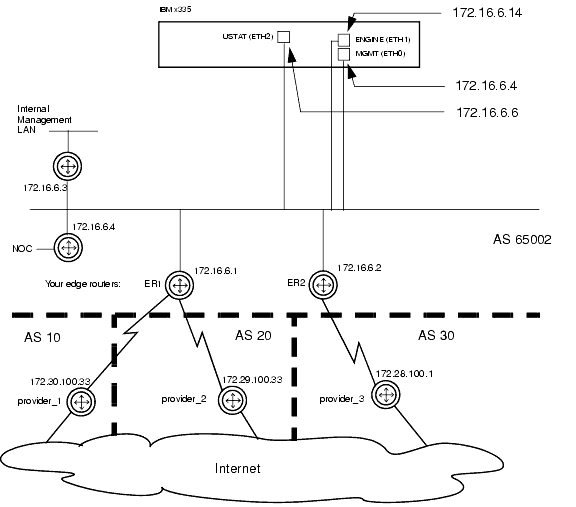
In the diagram, the engine, management and USTAT ports are all connected to the same network. This is not a requirement, as long as the engine module is connected to the edge routers for BGP peering, the USTATs are connected to the edge routers for traffic measurements, and the management module is reachable by anybody who needs access to it.
Your xSeries configuration should contain a block of text similar to this:
module engine

 bgp 65002

  neighbor 172.16.6.1 link provider_1

  neighbor 172.16.6.1 remote-as 65002

  neighbor 172.16.6.1 link provider_2

  neighbor 172.16.6.2 link provider_3

  neighbor 172.16.6.2 remote-as 65002

 end

end
|
|
|