Control Panel
Clicking any of the first four graphs in each row to display a more detailed version in the information window. Click the entries in the remaining two graphs, Top Networks Not Rescued and Top Rescued Networks (Multi-path only), to display a one-line report for each network of interest. If you click a specific network in either of these reports, you get the Per-Network Information report (Figure 9). The top section contains information on the network. This information includes the winning network, decision policy, and application model involved. The two charts on the right display delay and jitter measurements as the measurements are collected. The data is available only on networks with prefixes receiving measurements from ICMP or traceprobe active-probing.
The third table shows the status of your links and the results of the measurements to the prefix as follows:
- Link--Your ISP links, which are listed by the configured link name.
- Codes--The following link codes as follows:
- b for BGP
- i for invalid choice
- o for outage detected
- a for asserted
- w for winner
- r for regular winner set
- e for extended winner set
- h for hot
- RTT--The average round-trip time (RTT) in milliseconds for the prefix on each link. This measurement is available only on links with prefixes that receive measurements from ICMP or traceprobe active-probing.
- Jitter--The average jitter in milliseconds for the prefix on each link. Jitter is calculated as the difference between consecutive RTT values. This measurement is available only on links with prefixes that receive measurements from ICMP or traceprobe active-probing.
- Loss--The average loss for the prefix on each link. This measurements are available only on links with prefixes that receive measurements from ICMP or traceprobe active-probing.
- TCP HRTT--The average TCP handshake RTT for the prefix on each link.
- Metric--The CNA-calculated metric for the prefix on each link. This metric is an index that ranges from 0 (best) to 1000 (worst). This metric shows the quality of the link and is indicative of the user experience.
- Total Count--The number of measurements to this prefix on each link.
- TSLM--The time since the last measurement in milliseconds.
- Reliability--A graph of the average time in minutes that the link spent in the winner set.
You can also select any of the following columns to generate a trending chart in the lower half of the display:
- RTT
- Jitter
- Loss
- TCP HRTT
- Metric
- Reliability
- Application Performance
- Application Delay
The fifth table shows pertinent BGP information on the prefix.
Figure 9: The Per-Network Information report
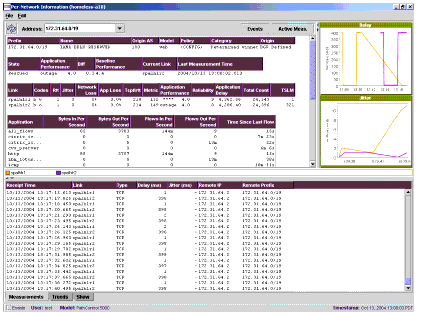
The bottom section has the following four tabs:
- Measurements--Shows information on the measurements that are made for each network as the CNA system processes the measurements.
- Trends--Shows information on one of the selected fields in the link table (first table in the report).
- Show--Shows the show commands that are accessible from the control panel. For more information on this, see the command show event in the CNA Command Reference Guide.

