

|
|
|
Choosing the optimal path using router route maps is accomplished by constructing site-links with two GRE and/or IPsec tunnels between edge routers or VPN gateways at your headquarters and remote sites and setting up route maps to direct network traffic to the appropriate tunnel.
NOTE: This section will cover the configuration of GRE tunnels; see your router or VPN gateway documentation on how to configure IPsec connections between sites.
These GRE or IPsec tunnels will be used to carry the internal traffic between headquarters and the remote site. To ensure as much diversity as possible, it's important to configure the tunnels to terminate on the public WAN IP address at each site. Using the WAN interfaces to terminate the tunnels benefits by:
1) Forcing the tunnel to always enter a site through the ISP that owns that IP address, thereby creating and maintaining diverse paths; and
2) Allowing the IP address space inside the remote site to be private addresses. This is convenient for those remote sites that are also connecting to headquarters through parallel site-links over a private WAN (Frame Relay or MPLS) service provider and are currently using private IP address space, as it eases the deployment for future hybrid private WAN / Internet VPN routing.
NOTE: If a remote site has only one connection to the Internet, usually adding a second connection would require requesting a either a very large number of IP addresses, and/or requesting the existing ISP to send a disaggregated network announcement over the Internet, which most ISPs won't do (to keep the Internet routing tables small). This usually results in all traffic entering a site on one ISP, but using both ISPs to exit the site. By using the WAN IP addresses as the tunnel endpoints, both ISPs can be used for inbound traffic.
See Figure 3 for reference to the configuration examples in this section
Figure 3: Multi-tunnel Remote Site
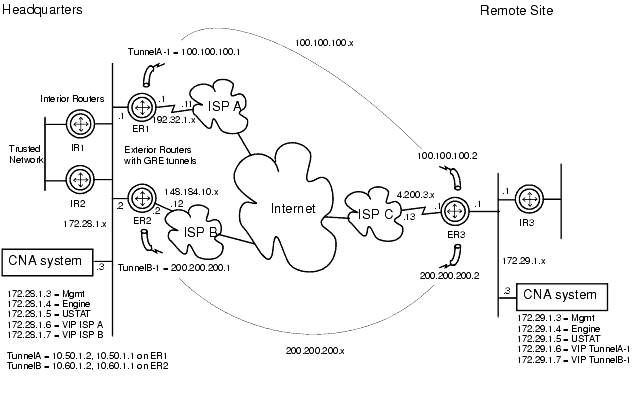
To implement this design, you would need to accomplish the following tasks:
Begin by configuring one end of a WAN tunnel on one of the routers at your headquarters site. For the tunnel source address, use the address of the interface that connects the headquarters router to ISP A. The tunnel destination will be the address of the interface that connects the remote router to the Internet, ISP C in this example.
In the example below, the tunnel source address is shown as 192.32.1.11 and the destination address is 4.200.3.1. Both ISP addresses should be public addresses.
Repeat for the second tunnel, shown as connecting 148.184.10.2 also to 4.200.3.1 in this example.
Chose two private-space /30 addresses to be the tunnel IP network. In this example, 100.100.100.1/30 is the IP address range assigned to the tunnel end at headquarters, and 100.100.100.2/30 is assigned to the tunnel end at the remote site.
NOTE: As always in Internet router configurations, there may be several specific ways to achieve similar goals. You may have only one edge router serving both links at either end of your VPN, and you may have chosen to use different interfaces on the routers-such as loopback addresses-than the layout shown here. Additionally, the router configuration commands used in the examples in this document are Cisco IOS commands. Your headquarters and remote-site networks may be laid out differently. These examples show how to implement just one of many possible solutions.
The following configuration commands show how to create the GRE tunnel TunnelA-1 on a Cisco router:
interface TunnelA-1

 description “Tunnel to remote site”

 ip address 100.100.100.1 255.255.255.252

 no ip directed-broadcast

 no ip proxy-arp

 tunnel source 192.32.1.1

 tunnel destination 4.200.3.1
At the other end of the tunnel, enter these commands on the remote router, reversing tunnel source and destination addresses and using the unused private-space address as tunnel IP address:
interface TunnelA-1

 description “Tunnel to HQ”

 ip address 100.100.100.2 255.255.255.252

 no ip directed-broadcast

 no ip proxy-arp

 tunnel source 4.200.3.1

 tunnel destination 192.32.1.1
Repeat the above commands for the tunnel TunnelB-1 with the 200.200.200.0/30 network on their respective routers.
In the rare event the CNA system cannot advise the routers which is the most optimal tunnel for the internal traffic, the routers should have at least one default path configured to send the traffic. It's highly recommended to insert floating static routes for this purpose.
A floating static route is a static route whose administrative distance is higher than a preferred routing method. In this case, the CNA system will be advising the router(s) through an BGP session, whose default administrative distance is valued at 200. Configuring a static route with an administrative distance of greater than 200 will provide a backup to the BGP learned routes. It's best to configure two floating static routes, one backing-up another for a higher level of redundancy.
The following configuration commands show how to create a floating static route on a Cisco router:
ip route 172.29.1.0 255.255.255.0 100.100.100.2 225

ip route 172.29.1.0 255.255.255.0 200.200.200.2 226
The floating static-routes above will choose TunnelA-1, unless its interface state is down, at which time it will use TunnelB-1.
As noted in the “Measuring with Policy Based Routing” section above, the routers should already be configured with PBR route maps for measurements to Internet locations. You now need to add route-map statements which match on both the source IP address (the CNA VIP) and the destination IP address (the remote Ethernet IP address of the router). These measurements, and ONLY these measurements targeted for your remote internal VPN address space, will be forced down each respective tunnel instead of the natural ISP next-hop address.
This requires an additional access lists and additions to the existing route map on the router. Your router's route-map should already look something like this:
access-list 188 permit ip host 172.28.1.6 any

route-map CNA-measurements permit 90

 match ip address 188

 set interface Serial0/0 Null0
You now need to add new statements BEFORE the above statements to ensure that the router catches the more specific match (source + destination), before it hits the catch all. So you would add the following:
access-list 171 permit ip host 172.28.1.6 host 172.29.1.1

route-map CNA-measurements permit 5

 match ip address 171

 set interface TunnelA Null0
These commands tell the router that the next-hop for measurement traffic from the TunnelA-1 VIP to the remote router's Ethernet address of 172.29.1.1 should be TunnelA.
NOTE: The Null0 command is important. If this Null0 is missing and the tunnel state is down, the measurement packets may be routed by the existing routing table and could give the CNA system false measurements, which could lead to unwanted routing decisions by the CNA system.
The final step is to ensure this PBR is applied to the “measurement tunnel” interface (which should already be in place from the initial configuration described in the section “Measuring with Policy Based Routing” above):
interface TunnelA

 ip address 10.50.1.1 255.255.255.252

 no ip directed-broadcast

 ip policy route-map CNA-measurements

 tunnel source 172.28.1.1

 tunnel destination 172.28.1.5
The updated PBR route-map should now look something like this (with the ACLs):
access-list 171 permit ip host 172.28.1.6 host 172.29.1.1

access-list 188 permit ip host 172.28.1.6 any


route-map CNA-measurements permit 5

 match ip address 171

 set interface TunnelA Null0

!

route-map CNA-measurements permit 90

 match ip address 188

 set interface Serial0/0 Null0
You would repeat these same configuration steps on the additional edge router connecting headquarters to ISP B, changing the IP addresses and descriptions accordingly.
|
|
|