

|
|
|
In order to get the responses back to the CNA system, the VPN device must have a way to reach the CNA VIP addresses. If your VPN and firewall implementations are within the same Juniper NetScreen device, and it is located on the same network as the CNA system, as pictured in Figure 6, enter the following command into the Juniper NetScreen configuration:
set interface trust gateway 172.16.6.1
Figure 6: Juniper NetScreen VPN and PIX firewall
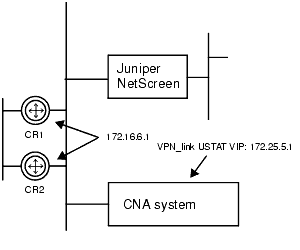
If the VPN and firewall devices are different, such as a Juniper NetScreen VPN and Cisco PIX firewall as pictured in Figure 7, enter the same command except the address is the interface on the firewall to which the VPN connects:
set interface trust gateway 172.28.2.1
Figure 7: Juniper NetScreen VPN and PIX firewall
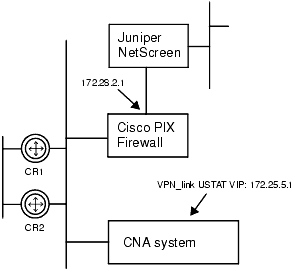
On the PIX Firewall, use the following command to allow the packets to reach the CNA USTAT VIP:
route inside 172.25.5.1 255.255.255.255 172.16.6.1
If you have a Check Point firewall, use the VPN/1-Firewall/1 policy editor to modify the rules to allow the packets to reach the CNA USTAT VIP, as described in the “Security Policy Rule Base” chapter of the Check Point Management Guide for VPN-1/Firewall-1 NG.
|
|
|