

|
|
|
Prefixes labeled R are those prefixes that have been obtained from BGP but which are not currently considered usable by the CNA system. They could be prefixes that are currently being reached by a BGP-selected route to a service provider which is outside of the CNA sphere of influence. This might occur if you have not yet configured the CNA system to recognize all of the your edge routers. Since the CNA system does not have a next-hop address for any service providers that are configured on the unknown router, it cannot assert routes to this link. However, because it is part of your BGP mesh, data from the router’s BGP table can still migrate to the CNA system.
For example, you might have three routers in your BGP mesh but have configured only two of them on the CNA system, as shown in Figure 3.
Figure 3: The R prefix category
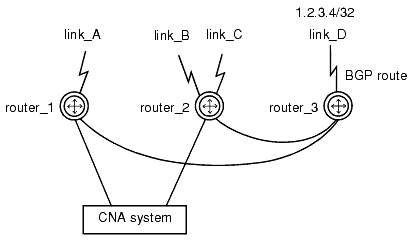
Since router_3 is not defined in the CNA configuration, the CNA system will learn of link_D, the BGP-selected route to prefix 1.2.3.4/32, from router_1 and router_2. When prefix 1.2.3.4/32 shows up in snapshot reports and in the output of the show prefix command, it will be labeled R. (You can learn the router’s next-hop address to the unknown link by executing the show prefix command with the router keyword and the IP address of router_3. The prefix 1.2.3.4/32 will be listed, but instead of a link name the BGP column will contain the address of link_D.)
NOTE: If you observe an abnormally high number of prefixes categorized as I (insufficient measurements) being listed at the top of your snapshot reports for an extended period of time, it may be caused by a false triggering of the outage-detection mechanism.
If the CNA system declares a service outage for a prefix before the device has acquired the minimum number of measurements for that prefix, the category classification could be erroneously shown as I even after the minimum has been achieved. This condition can occur when the single pixel GIF hit rate for a prefix is very low but two hits arrive closely spaced on one of your links. The condition is most likely to occur on systems with two service providers. The more CNA links you have configured, the less likely you are to experience this condition.
To fix the condition, increase the time value of the outage-detection silence command. If you continue to observe excessive I categories, increase the value some more. When all prefixes that are of interest to you have achieved the minimum number of measurements required to no longer be classified as I, you can readjust the silence interval as desired.
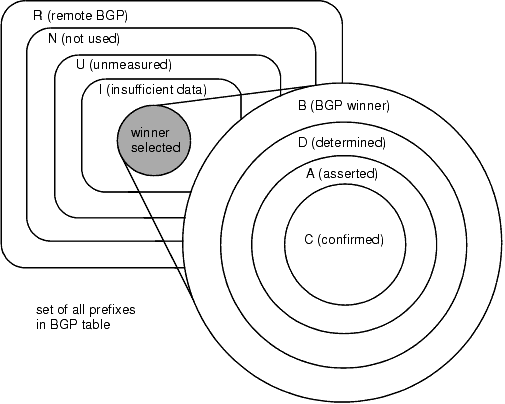
The relationships among prefix categories are illustrated by Figure 4:
The following additional labels may be combined with the category labels in the show prefix display to qualify the data:
|
|
|