

|
|
|
The trending database obtains data from one of three sources--the snapshot copy of the engine module’s in-memory database, from an internal CNA performance-monitoring process, and from polling the SNMP agents on your edge routers.
Data samples which the trending process obtains from the snapshot database are stored in the hourly field; data samples obtained by the SNMP polling or internal CNA processes are stored in sample fields in the archives.
In addition, the trending process keeps a running total of incoming values which it uses to populate the following fields:
The trending process will calculate an average if hourly data values were received for at least half of the hours in the period. If less than half of the hours have values (if the system was down, for example), then the average for that period is stored as invalid, which will result in a gap in any graph line that uses that set of average values.
For example, if the 24-hour average is based on values received from 8 a.m. to 8 a.m. and the system is taken offline from 9 a.m. until shortly before noon, no snapshot copies of the database will be made for the hours of 9, 10 and 11 a.m. The daily average for that period will be calculated from the 21 hourly values that were received.
If the system had been down from 9 a.m. until midnight, as many as 15 hourly snapshots would have been missed. With only nine hourly values for that period, the daily average would not be calculated and the database entry will be marked invalid.
Figure 2: Populating the Trend Database
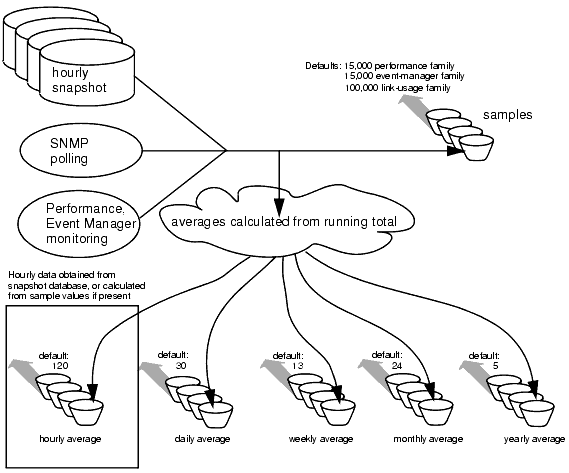
In addition to the raw hourly values and calculated averages, the database also stores minimum and maximum hourly values for each time period.
By default, database archives will be created large enough to store 120 hourly values from the snapshot database, 15,000 performance-monitored values, 15,000 event-manager values, and 100,000 link-usage family values; 120 hourly average polled values, 30 daily average, minimum and maximum values; 13 weekly average, minimum and maximum values; 24 monthly average, minimum and maximum values; and 5 yearly average, minimum and maximum values for each trended prefix.
You can change these sizes with the trending size (deprecated) command. Use the show trending command to see current settings.
The trending database is stored on the CNA system’s hard disk and will survive system reboots.
|
|
|