

|
|
|
The topology map is a graphic presentation of your agent-based network. It shows network nodes, CNA test agents, and links between devices (called edges). Edges can be unidirectional or bidirectional. Arrows indicate the direction of each edge. Edges are colored to show their measured network performance. Figure 27 shows a topology map.
Figure 27: Topology map: monitoring view
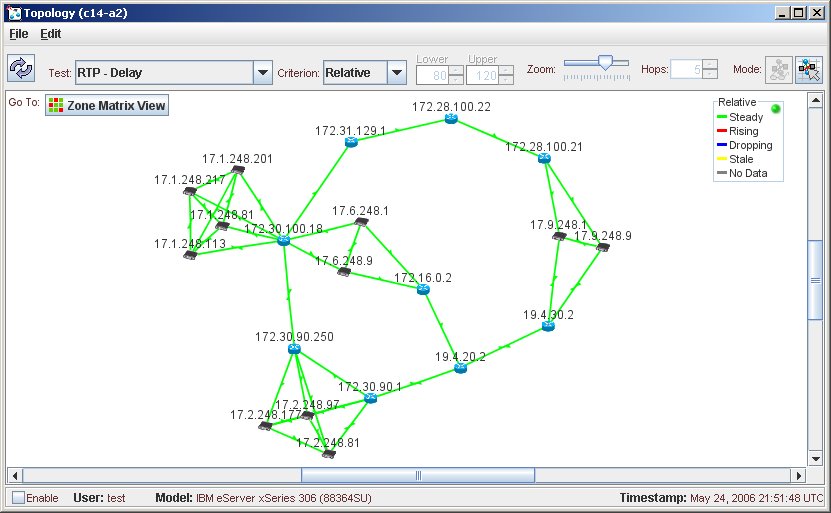
Hold the mouse over any edge to see its test results. Hold the mouse over any network device to see its name, IP address, and type.
By default, the zone matrix shows test results for RTP delay in terms of the relative thresholds (steady, rising, dropping, stale, or no data). For more information on relative thresholds, see Chapter 5: Configuring Agent-Based Measurement in the CNA Basic Monitoring Guide.
In the top, right-hand corner of the window, a color key shows the colors used to indicate the various measurement statuses. The statuses vary according to the display criterion that you select.
|
|
|