|
The internal view of the S3400-H varies, depending on the type of
motherboard and redundant power supply that is installed. Note the
configuration that your S3400-H uses:
- S3400-H with vertically stacked power supplies and a nonintegrated
video and LAN
- S3400-H with side-by-side power supplies and an integrated video
and LAN
Note: An S3400-H with an integrated video and LAN
always uses side-by-side redundant power supplies. An S3400-H with
a nonintegrated video and LAN usually uses vertically stacked redundant
power supplies, although it might use the side-by-side model.
S3400-H with vertically stacked power supplies and a nonintegrated
video and LAN
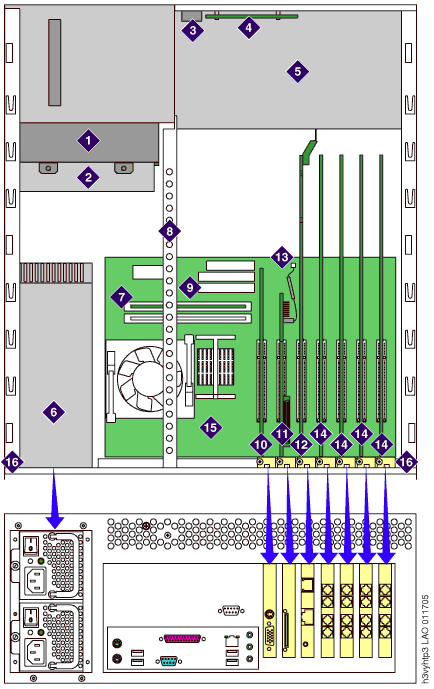
| 1 |
Drive
cage |
| 2 |
DVD-RAM
drive |
| 3 |
Power
switch |
| 4 |
LED
panel (contains reset switch) |
| 5 |
Chassis
fan housing |
| 6 |
Power
supply |
| 7 |
Memory
module (DIMM card) |
| 8 |
Inside
rail for card hold-down bracket |
| 9 |
Secondary
IDE connector |
| 10 |
Video
card |
| 11 |
SCSI
RAID controller card |
| 12 |
Remote
Maintenance Board (RMB) |
| 13 |
SCSI
LED cable |
| 14 |
Analog
port boards |
| 15 |
Motherboard
|
| 16 |
Top
cover guide rail |
S3400-H with side-by-side power supplies and a integrated
video and LAN
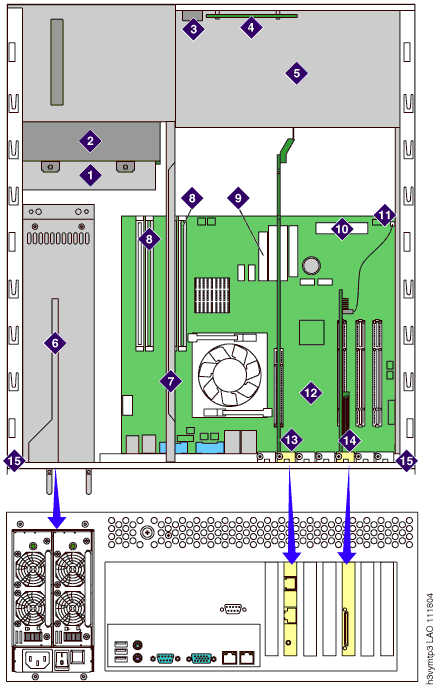
| 1 |
DVD-RAM
drive |
| 2 |
Drive
cage |
| 3 |
Power
switch |
| 4 |
LED
panel (contains reset switch) |
| 5 |
Chassis
fan housing |
| 6 |
Power supply |
| 7 |
Inside
rail (used for lever-type circuit card hold-down bracket) |
| 8 |
Memory
module (DIMM card) |
| 9 |
Main
power connector |
| 10 |
Front
panel connector |
| 11 |
SCSI LED
cable |
| 12 |
Motherboard
|
| 13 |
Remote
Maintenance Board (RMB) |
| 14 |
SCSI
RAID controller card |
| 15 |
Top
cover guide rail |
Top of page
|