|
Modular Messaging Help
|
|

|
MAS - CA - Schedule Grid
|
The Schedule grid is launched via the Weekly schedule button on the Properties dialog, General tab, for a Conditional Goto Action Type. See MAS - CA - Properties - General - Conditional Goto Action Type.
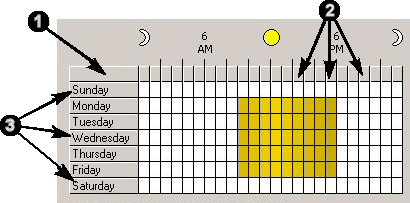
The grid has weekdays along the y-axis and the time of day along the x-axis (see the figure below).
1 Select all cells in the grid.
2 Select all cells in the column by clicking the column headers.
3 Select all cells in the row by clicking the row headers.
To configure the schedule grid:
- Clicking a cell toggles its state:
- The Off state is shown in white.
- The On state is shown in blue, if your system has a low number of colors available, or a variant of gold, if your system has enough colors.
- To toggle multiple cells at once, click and hold inside a cell and drag the mouse cursor over other cells.
- Schedule View Select the time interval to represent the cells of the grid: 1 hour (default), 15 minutes or 5 minutes.
- Observe system holidays as after hours Select to configure the caller application to check the Automated Attendant’s settings. It will then observe the same holidays, like Christmas day, even if mid-week.
Top of page