|
 |
 |
 |
 |
 |
 |
 |
 |
 |
Made Easy Tool for DEFINITY Media Server Configurations
Issue 4, May 2002
Bring the System Online
Install Removable Media (MCC1 only)
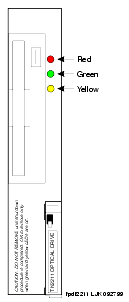
Insert the formatted removable media, label facing left, into the optical drive (see TN2211 Optical Drive).
|
|
|
|
|
|
|
|
|
|
Made Easy Tool for DEFINITY Media Server Configurations
Issue 4, May 2002
Bring the System Online
Insert the formatted removable media, label facing left, into the optical drive (see TN2211 Optical Drive).
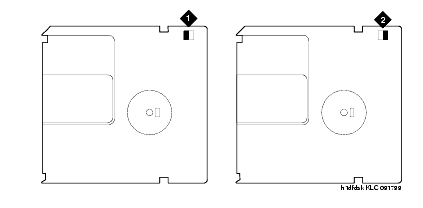
| Note: | Make sure the formatted removable media is not write-protected (see Make sure the disk is not write protected) before placing it into the optical drive. |
TN2211 Optical Drive
Make sure the disk is not write protected
|
|
|
|
|
|
|
|
|
|
| Copyright� 2002 Avaya Inc. |
| Send comments to MadeEasy Development Team |
| Always check at the Made Easy Web site for the most current information. |