

|
|
|
Administering AMADMIN provides direct links to one or more WML applications. As Figure 5 shows, the first level Avaya Menu includes entries for three (sample) WML applications, a Phone Settings menu choice for telephone options and settings, and the telephone log out.
Figure 5: Avaya Menu with WML Applications Installed as the first three Menu options
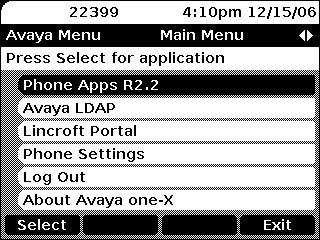
Given that at least one WML application is administered, the administrator can choose to specify the order in which not only the WML applications are presented, but also the order in which the built-in applications are presented. Any built-in applications that are not specifically administered in the WML Administration file are automatically appended to the end of the administered list, in the following order:
Selecting (highlighting) an application and pressing Select or OK launches the application. When the Phone Settings application is listed, the Choice Indicator is also displayed on the Title Line. Pressing the Left or Right Navigation buttons displays the Phone Settings Screen. Selecting Phone Settings brings up the Phone Settings menu, shown in Figure 6.
Figure 6: Second Level Avaya Menu - Phone Settings Screen
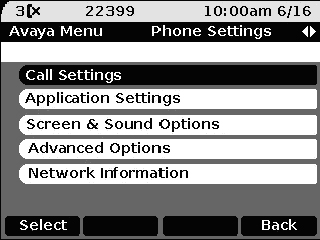
This menu is essentially the same as the current (pre-Release 1.2) Avaya Menu and provides access to user settings as well as the Log Out function.
|
|
|