Web Agent Procedure
To enable an access list:
* Note: Before you can enable an access list, you must first configure the access list. For information about configuring access lists, see "Configuring Access Lists" earlier in this chapter.
- In the navigation pane, expand the Routing > IP > Configuration folders, and then click Access Control.
The IP Access Control Web page is displayed in the content pane. See Figure�13-4.
Figure 13-4. IP Access Control Web Page
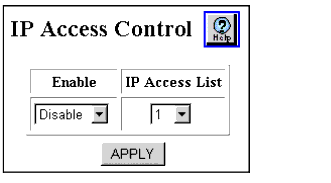
- Select Enable from the Enable field pull-down menu to filter inbound traffic.
- Select the name of the access list to be used for filtering when IP access control is enabled from the IP Access List field pull-down menu.
- Click APPLY to save your changes.

