Web Agent Procedure
To create an AppleTalk zone filter using the Web Agent:
- In the navigation pane, expand the Routing > AppleTalk > Configuration folders, and then click Zone Filter.
The AppleTalk Zone Filter Web page is displayed in the content pane. See Figure�19-16.
Figure 19-16. AppleTalk Zone Filter Web Page
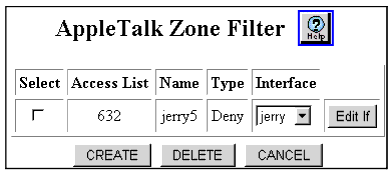
- Select CREATE. The Add AppleTalk Zone Filter Web page is displayed. See Figure�19-17.
Figure 19-17. Add AppleTalk Zone Filter Web Page�
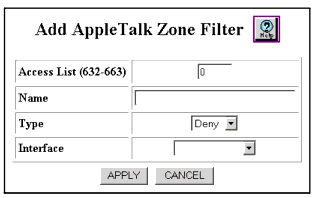
- See Table�19-4 to configure the Add AppleTalk Zone Filter Web page parameters.
- Click APPLY to add the new zone filter, or CANCEL to restore previous settings.
Table 19-4. Add AppleTalk Zone Filter Web Page Parameters
| Parameter |
Definition |
| Access List |
Enter the access list number to be associated with the zone filter. Valid values are 632-663. |
| Name |
Enter the name of the zone to be filtered. You can also leave this field blank for wildcarding. |
| Type |
Select the type of filtering. The options include:
|
| Interface |
Select the interface to apply this filter to. |
| END |

