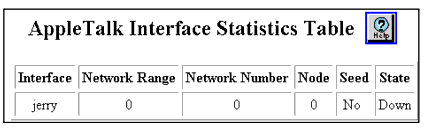
Table 19-6. AppleTalk Interface Statistics Table Parameters
| Parameter |
Definition |
| Interface |
Displays the name of the AppleTalk interface. |
| Network Range |
Displays the network range associated with the AppleTalk interface. |
| Network Number |
Displays the network number of this node. |
| Node |
Displays the node number of this node. |
| Seed |
Displays whether the AppleTalk interface seeded the network. |
| State |
Displays the state of the AppleTalk interface. The options include:
- Up - indicates that the AppleTalk interface is active.
- Down - indicates that the AppleTalk interface is inactive.
|
| END |