Web Agent Procedure
To configure a DNS client by using the Web Agent:
- In the navigation pane, expand the System > Configuration folders, and then click DNS. The DNS Configuration Web page is displayed in the content pane. See Figure�11-1.
Figure 11-1. DNS Configuration Web Page
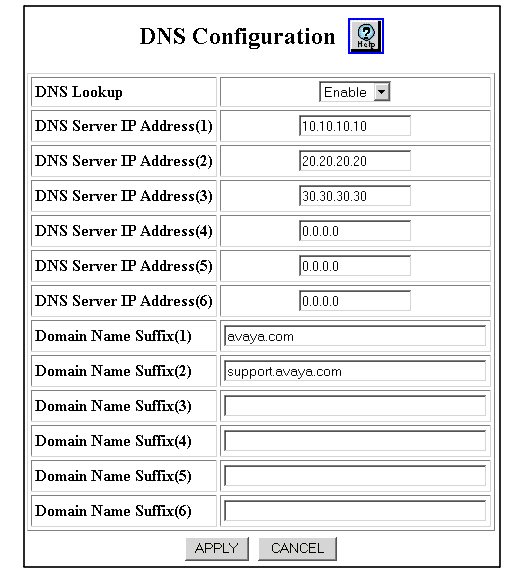
- Select Enable from the DNS Lookup field pull-down menu to enable DNS on the switch.
*Note: When DNS is enabled and configured, you can enter DNS names in place of IP addresses for the following CLI commands. Again, DNS is for use with the CLI only for testing connectivity and copying files from TFTP servers, not the normal operation of the Avaya Multiservice switch.
- ping
- telnet
- connect
- trace (traceroute)
- copy tftp
- Enter the DNS server IP address for each DNS server in the DNS Server IP Address fields (fields 1-6).
- Enter the domain name suffix for each DNS server in the Domain Name Suffix fields (fields 1-6).
- Click APPLY to save your changes, or CANCEL to restore previous settings.

