

|
|
|
To display the forwarding cache information using the Web Agent:
The Active FE Cache Web page is displayed in the content pane. See Figure�22-5.
Figure 22-5. Active FE Cache Web Page
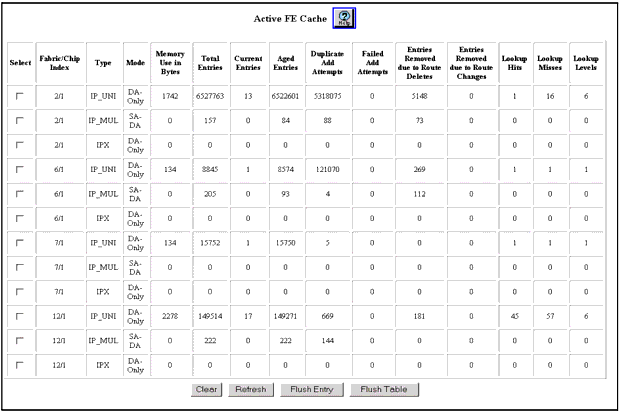
* Note: Flushing the table will disrupt traffic flow and clear all Forwarding Entries, and all flows must be relearned.
| Parameter |
Defines... |
|---|---|
| Fabric/Chip Index |
The Packet Routing Engine in question. |
| Type |
The type of packet (for example, IP unicast, IP multicast). |
| Mode |
The table mode which includes:
The table mode indicates what values are used in a comparison to determine whether or not a packet is forwarded. |
| Memory Use in Bytes |
Memory used by each entry. |
| Total Entries |
The number of cumulative entries since the last time the statistics were cleared. |
| Current Entries |
The number of active entries. If this number reaches the Maximum Entries setting for the protocol, you may want to enable a short-lived protocol filter to conserve the forwarding engine resources. For information on how to enable a short-lived protocol filter, see "Configuring Short-Lived IP Protocol Filters" in Chapter�12, "Configuring IP Routing." |
| Aged Entries |
The number of entries aged out. |
| Duplicate Add Attempts |
The number of attempts at adding the same slow path entries. |
| Failed Add Attempts |
The number of failed attempts at adding a forwarding entry. |
| Entries Removed Due to Route Deletes |
The number of entries removed because of route deletions. |
| Entries Removed Due to Route Changes |
The number of entries removed because of route changes. |
| Lookup Hits |
The number of incoming packets that was found in the cache. |
| Lookup Misses |
The number of incoming packets that was not found in the cache. |
| Lookup Levels |
Cache depth. |
| END | |
|
|
|