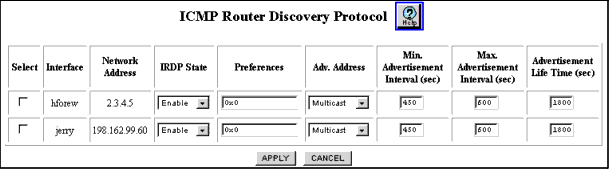
Table 12-33. ICMP Router Discovery Protocol Web Page Fields
| Parameter |
Allows You to... |
| Select |
Select the interface to be configured. |
| Interface |
View the IRDP interface name. |
| Network Address |
View the network IP address of the IRDP interface. |
| IRDP State |
Select Enable IRDP on the selected interface. The default value is Disable. |
| Preferences |
Enter the preference of the address as a default router address, relative to other router addresses on the same subnet. The minimum value (80000000 hex) is a signed 32-bit value used to indicate that the address should not be used by neighboring hosts as a default router address, even though it may be advertised. The default value is 0. |
| Adv. Address |
Select an IP destination address used for multicast router advertisements sent from the interface. Options include:
- Multicast - Used on any link where listening hosts support IP multicast. The default value is 224.0.0.1.
- Broadcast - Used on any link where listening hosts support IP unicast. The default value is 255.255.255.255.
|
| Min. Advertisement Interval (sec) |
Enter the minimum time (in seconds) that is allowed between sending unsolicited multicast router advertisements from the interface. This value must be no less than three seconds and no greater than the Max. Advertisement Interval. The default value 450 is 0.75 times the maximum interval. |
| Max. Advertisement Interval (sec) |
Enter the maximum time (in seconds) allowed between sending multicast router advertisements from the interface. This value must be no less than four seconds and no greater than 1800 seconds. The default value is 600 seconds. |
| Advertisement Life Time (sec) |
Enter the time (in seconds) of the life of a router advertisement that is sent from the interface. This value must be no less than the maximum advertisement interval and no greater than 9000 seconds. The default value is 1800. |
| END |