In the navigation pane, expand the Routing > IPX > Display folders, and then click Route Table Search.
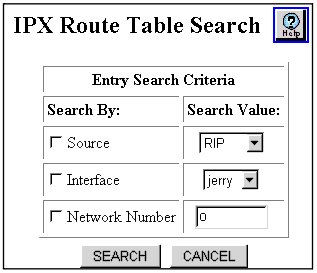
The IPX Route Table Search Web page is displayed in the content pane. See Figure�16-13.
Figure 16-13. IPX Route Table Search Web Page
Select the SEARCH Criteria you want to use to find information on specific routes. For example, if you want to find all static routes that are presently configured on your switch, search by source and specify static as your search value.
See Table�16-7 to determine the search parameters:
Table 16-7. IPX Route Table Search Parameters
Parameter
Allows you to...
Source
Search the IPX route table using of the following parameters:
RIP - RIP routing updates
Static - User configuration
Local - Directly connected routes
Once you select a parameter, you can search to find the routes associated with that parameter.
Interface
Search the IPX Route table using the interface associated with the next-hop to the IPX network.
Network Number
Search the IPX Route table using the IPX Network address (hexadecimal number) you specify.
END
Click on the Search button to start:
If the available routes are found they are displayed in the IPX Route Table Web page.
If no routes are available, a message is displayed in the IPX Route Table Web page.