Previous page Next page

Displaying IPX Service Table Statistics

To display the IPX service table statistics:

  1. In the navigation pane, expand the Routing > IPX > Display folders, and then click Service Table Statistics.
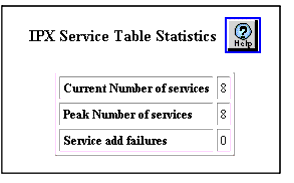
  2. The IPX Service Table Statistics Web page is displayed in the content pane. See Figure�16-16.

Figure 16-16. IPX Service Table Statistics


  1. See Table�16-12 to review each statistic:

Table 16-12. IPX Service Table Statistics Web Page
Statistic
Defines the...
Current Number of Services
The current number of IPX services.
Peak Number of Services
The peak number of services.
Service Add Failures
The number of failed attempts to add a service to the routing table.
END


Previous page Next page