Previous page Next page

Web Agent Procedure

To configure intelligent multicasting globally using the Web Agent:

  1. In the navigation pane, expand the Layer 2 Switching > Intelligent Multicast folders, and then click Global Configuration.
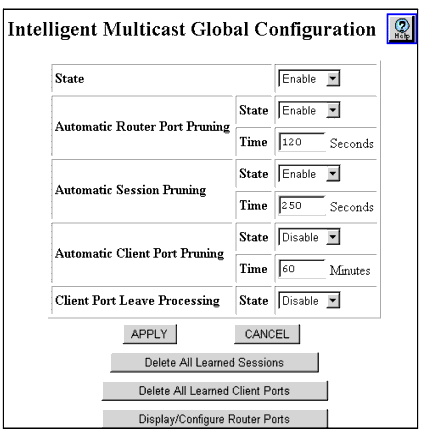
  2. The Intelligent Multicast Global Configuration Web page is displayed in the content pane. See Figure�20-2.

* Note: You cannot delete Static sessions and client ports from this Web page. See "Deleting a Multicast Session Client Port" and "Deleting Static Multicast Sessions" in this chapter to delete static sessions and client ports.

Figure 20-2. Intelligent Multicasting Global Configuration Web Page

*Note: In order to route multicast traffic, IP multicast forwarding must be enabled on the switch. See "Enabling IP Routing Global Parameters" in Chapter�12, "Configuring IP Routing."

  1. See Table�20-1 to configure the Intelligent Global Multicast Configuration Web page parameters.
  2. Click

Table 20-1. Intelligent Global Multicast Configuration Web Page Parameters
Parameter
Definition
Enable State
Select Disable to prevent intelligent multicasting globally. The default value is Enabled.
Automatic Router Port Pruning
Select:
  • Disable - to prevent automatic router port pruning. The default value is Enable.
  • Time - Enter the time, in seconds, after which quiet learned router ports can be pruned. The valid range (in seconds) is 10 to 172800 (48 hours). The default value is 120 seconds.
Automatic Session Pruning
Select:
  • Disable - To prevent automatic removal of stale sessions. The default value is Enable.
  • Time - Enter the time, in seconds, after which stale learned sessions can be removed. The valid range (in seconds) is 10 to 172800 (48 hours). The default value is 250 seconds.
Automatic Client Port Pruning
Select:
  • Disable - to prevent the automatic removal of quiet learned client ports from a session. The default value is Disable.
  • Time - Enter the time, in minutes, after which quiet learned client ports can be automatically removed from a session. The valid range (in minutes) is 1 to 1440 (24 hours). The default value is 60 minutes.
END


Previous page Next page