Web Agent Procedure
To delete a multicast session client port by using the Web Agent:
- In the navigation pane, expand the L2 Switching > Intelligent Multicast folders, and then click Session Search.
The Intelligent Multicast Session Search Web page is displayed in the content pane. See Figure�20-4.
- Select SEARCH to begin the search for the multicast session. The Multicast sessions Web page is displayed with the search results. See Figure�20-5.
- Select the client port number from the Client Ports column. The Multicast Session Client Port Web page is displayed. See Figure�20-6.
Figure 20-6. Multicast Sessions Client Port
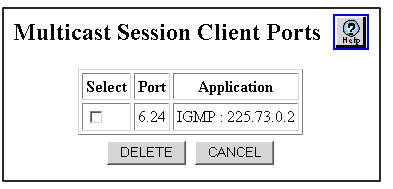
- See Table�20-5 for an explanation of the Multicast Session Client Port Web page parameters.
- Click DELETE to remove your selected multicast session client port, or CANCEL to restore previous settings.
* Note: Static (Mgmt) client ports can only be removed through the Static Sessions Web page.
Table 20-5. Multicast Session Client Port Web Page Parameters
| Parameter |
Definition |
| Select |
Select the multicast session client port. |
| Port |
Displays the client port number. |
| Application |
Displays the application(s) associated with this client port. The applications are:
|
| END |

