Web Agent Procedure
To create a new static multicast session using the Web Agent:
- In the navigation pane, expand the L2 Switching > Intelligent Multicast folders, and then click Static Sessions.
The Static Multicast Sessions Web page is displayed in the content pane. See Figure�20-7.
*Note: You must enable intelligent multicasting on a global basis to make your static multicast session active. See "Configuring Global Intelligent Multicasting" earlier in this chapter.
Figure 20-7. Static Multicast Session Web Page
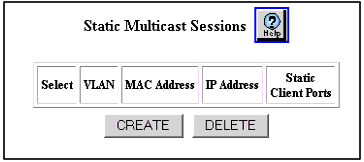
- Select Create to create a new session. The Static Multicast Session Configuration Web page is displayed. See Figure�20-8.
Figure 20-8. Static Multicast Session Configuration Web Page
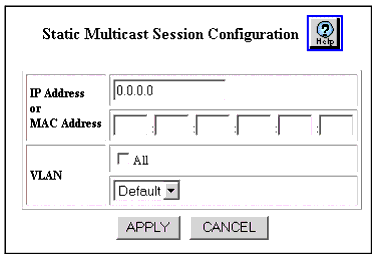
- Configure the Static Multicast Session Configuration Web page parameters. See Table�20-6.
- Click APPLY to create the new static multicast session, or CANCEL to restore previous settings.
Table 20-6. Static Multicast Session Configuration Web Page Parameters
| Parameter |
Definition |
| IP Address |
Enter the IP address of the new static multicast session. The range must be between 224.0.1.0 to 239.255.255.255. |
| MAC Address |
Enter the MAC address of the new static multicast session. Specifying the MAC address is not used for an IP multicast session. |
| VLAN |
Enter the VLAN associated with the new multicast session. Click All to add all VLANs to the multicast session, or select a specific VLAN from the pull-down menu. |
| END |

