Previous page Next page

Web Agent Procedure

To delete a static multicast session using the Web Agent:

  1. In the navigation pane, expand the L2 Switching > Intelligent Multicast folders, and then click Static Sessions.
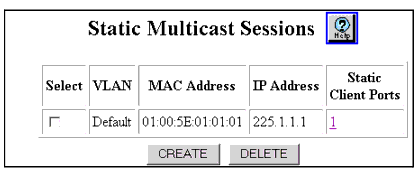
  2. The Static Multicast Sessions Web page is displayed in the content pane. See Figure�20-9. See Table�20-7 for an explanation of the Static Multicast Sessions Web page parameters.

Figure 20-9. Static Multicast Sessions Web Page


  1. Select the checkbox next to the static multicast session that you want to delete.
  2. Click DELETE to remove the static multicast session.

Table 20-7. Static Multicast Sessions Web Page
Parameter
Definition
Select
Select the static multicast session to be deleted.
VLAN
Displays the VLAN on which the static multicast session exists.
MAC Address
Displays the MAC address of the static multicast session.
IP Address
Displays the IP address associated with the static multicast session, if available.
Static Client Ports
Displays the number of static client ports associated with the static multicast session and opens the Static Multicast Session Client Ports Web page.
END


Previous page Next page