In the navigation pane, expand the Events folder, and then click Statistics.
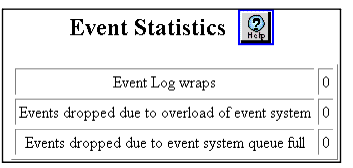
The Event Statistics Web page is displayed in the content pane. See Figure�21-6.
Figure 21-6. Event Statistics Web Page
See Table�21-5 for an explanation on the Event Statistics Web page parameters.
Table 21-5. Event Statistics Web Page Parameters
Parameter
Definition
Event Log wraps
Displays the number of times the event log has wrapped. The event log may or may not wrap, depending on how many events have been sent to the event log and when it was last cleared. When the event log does wrap, the old events are discarded and replaced with the newest events.
Events dropped due to overload of event system
Displays the number of events that were dropped to prevent overloading.
Events dropped due to event system queue full
Displays the number of events that were dropped due to a full Event System queue.