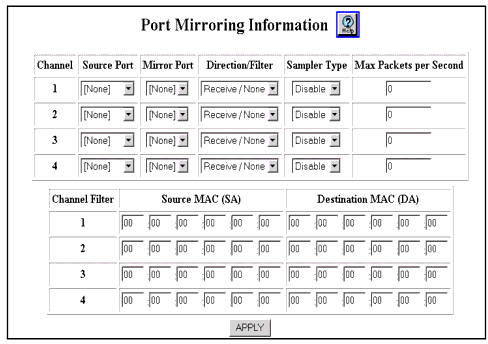
Table 23-5. Port Mirroring Information Web Page Parameters
| Parameter |
Definition |
| Channel |
Displays the channel number. Four channels are provided for monitoring traffic, so you can monitor four different ports or port ranges simultaneously. |
| Source Port |
The port that you want to mirror. |
| Mirror Port |
The port to which you want to mirror traffic. Both the source port and mirror port must either:
- Be on the same VLAN and have the same VLAN binding
or
- Have VLAN binding set to bind to all
|
| Direction/Filter |
The direction of traffic that you want to mirror and the filter that you want to set up, if any. Options are:
- Receive/None-Mirrors all receive traffic.
- Transmit/None-Mirrors all transmit traffic.
- Both/None-Mirrors all transmit and receive traffic.
- Receive/SA Filter-Mirrors receive traffic that has the source MAC address that you specify in the Source MAC (SA) field.
- Transmit/DA Filter-Mirrors transmit traffic that has the destination MAC address that you specify in the Destination MAC (DA) field.
|
| Sampler Type |
Specifies how often you want the mirror port to receive traffic samples. Options are:
|
| Max Packets per Second |
The maximum number of packets per second that you want the mirror port to receive. Enter a number in this field only if you selected Periodic in the Sampler Type field. |
| Channel Filter |
Displays the channel number. |
| Source MAC (SA) |
The source MAC address that you want to mirror traffic for. Enter a MAC address in this field only if you selected Receive/SA Filter in the Direction/Filter field. |
| Destination MAC (DA) |
The destination MAC address that you want to mirror traffic for. Enter a MAC address in this field only if you selected Transmit/DA Filter in the Direction/Filter field. |
| END |