Web Agent Procedure
To create a new OSPF summary using the Web Agent:
- In the navigation pane, expand the Routing > IP > OSPF folders, and then click Summaries.
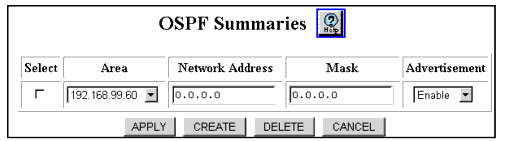
The OSPF Summaries Web page is displayed in the content pane. See Figure�15-7.
*Note: This Web page will display OSPF summaries only if you have previously configured one or more summaries.
Figure 15-7. OSPF Summaries Web Page
- Select CREATE. The Add OSPF Summary Web page is displayed. See Figure�15-8.
Figure 15-8. Add OSPF Summary Web Page
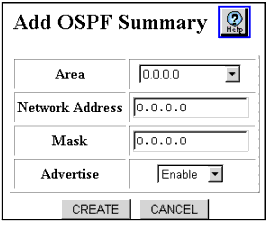
- See Table�15-5 for details about the Add OSPF Summary Web page parameters:
Table 15-5. Add OSPF Summary Web Page Parameters
| Parameter |
Definition |
| Area |
Select the area ID of the area from which the routes are aggregated (summary IP address). |
| Network Address |
Enter the IP address of the network to be advertised. |
| Mask |
Enter the subnet mask of the network to be advertised. |
| Advertise |
Select the ability to suppress (disable) or enable advertisements of this summary. When suppressing, advertisements of IP routes in this range are also suppressed. |
| END |
- Click CREATE to save the new OSPF summary, or CANCEL to ignore the new summary.

