Web Agent Procedure
To create OSPF areas using the Web Agent:
- In the navigation pane, expand the Routing > IP > OSPF folders, and then click Areas.
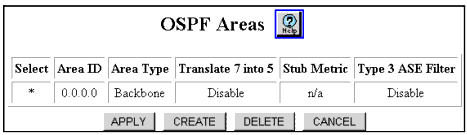
The OSPF Areas Web page is displayed in the content frame. See Figure�15-2.
* Note: The Area ID 0.0.0.0 is a backbone area and always exists in an OSPF configuration.
Figure 15-2. OSPF Areas Web Page
- Click CREATE. The Add OSPF Area Web page is displayed. See Figure�15-3.
Figure 15-3. ADD OSPF Area Web Page
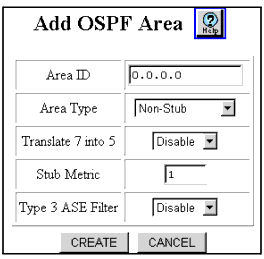
- See Table�15-2 to configure the Add OSPF Area Web page parameters.
- Click CREATE to save your changes, or CANCEL to restore previous settings.
Table 15-2. Add OSPF Area Web Page Parameters
| Parameter |
Allows you to... |
| Area ID |
Specify the Area ID (32-bit character) for the new area. This must be a unique ID within AS.
Note: Do not use 0.0.0.0 as an area ID.
|
| Area Type |
Select the type of area. Types include:
- Non-Stub - Non-edge device/router.
- Stub - An edge device/router that does not leak external advertisements.
- Not-so-stubby - This is still a stub area, however, this device/router can leak some external advertisements.
|
| Translate 7 into 5 |
Enable or Disable the translation of the NSSA ASE Type 7 into an AS External LSA Type 5. |
| Stub Metric |
Specify the stub area default summary cost metric. (Default is 1). |
| Type 3 ASE Filter |
Select to enable or disable the Type 3 summary LSA filter for Stub and NSSA only. |
| END |

