

|
|
|
To configure ports on a Fast Ethernet module using the Web Agent:
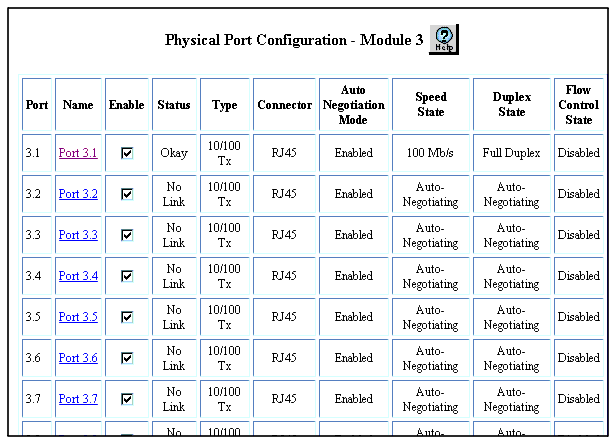
Figure 8-7. Physical Port Configuration Web Page for the Fast Ethernet Module
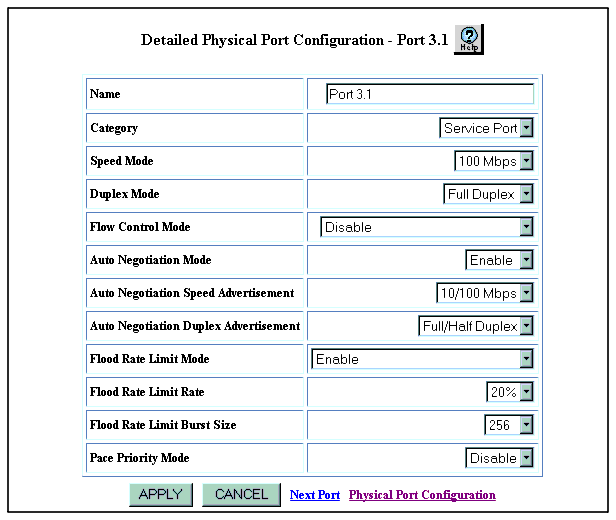
The Detailed Physical Port Configuration Web page for that port is displayed. See Figure�8-8.
Figure 8-8. Detailed Physical Port Configuration Web Page for Port on Fast Ethernet Module
*Note: This feature is only available for 10/100 TX modules.
Enable - Sets the port to both send and receive pause signals. This setting prevents buffer overflows on both local and remote port.
Disable - Sets the port to neither send or receive pause signals. Use this setting when flow control is causing congestion in other areas of the network.
Enable (with Aggressive Backoff) - Limits the size of flow control burst on TX and FX ports.
*Note: This feature is only available for 10/100 TX modules.
Auto Negotiation works best when the port or device on the other end of the connection is also set to Auto Negotiation. If you are having problems with Auto Negotiating connections, manually set the modes using the CLI.
*Note: The Speed and Duplex features are only available for 10/100 TX modules.
The switch sends the Speed and Duplex advertisement values to the device on the other end of the connection at the start of the auto-negotiating process. In general, the defaults are best, but there may be situations when you want to fix one setting, but allow the other setting to auto-negotiate.
Enable - If you want this port to limit the number of unknown unicast and multicast (flooded) packets it tries to forward
Disable - If you do not want this port to limit the number of unknown unicast and multicast packets it tried to forward
Enable (include Known Multicasts) - If you want to optionally include known multicast packets in this percentage to further decrease the possibility of the port's output buffer being overwhelmed.
*Note: Set this value lower if the port is having overflow problems.
*Note: Set this value lower than 1024 (the output buffer's capacity) for Fast Ethernet ports. Also set this value lower if the port is experiencing overflow problems.
Table�8-5 describes in detail the Fast Ethernet port parameters:
|
|
|