Web Agent Procedure
To display your switch's power system statistics using the Web Agent:
- In the navigation pane, expand the System > Configuration folders, and then click Power System.
The Power System Web page is displayed in the content pane and displays your switch's current power statistics. See Figure�3-8.
Figure 3-8. Power System Web Page
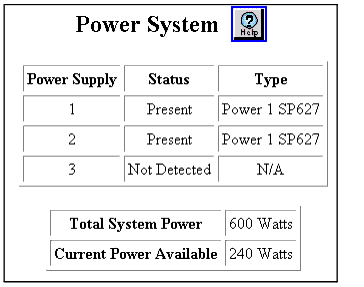
- See Table�3-3 and review the Power System Web page parameters:
Table 3-3. Power System Web Page Parameters
| Parameter |
Definition |
| Power Supply |
Identifies the power supply |
| Status |
indicates whether the power supply is detected. |
| Type |
Describes the type of power supply detected. |
| Total System Power |
Displays the total system power in Watts. |
| Current Power Available |
Displays the current power available. |
* Note: The Total System Power field displays 1400 Watts if three power supplies are installed. The switch uses power from only two of the three power supplies. The third power supply is a redundant power supply and is used only if one of the other power supplies fails.

