Previous page Next page

Web Agent Procedure

To reset your switch using the Web Agent:

* Note: You can also reset your switch using the Module Reset button located on the Supervisor module. See the Installation Sheet that came with the Supervisor Module for details.

  1. In the navigation pane, expand the System folder, and then click System Reset. The System Reset Page Web page is displayed in the content pane. See Figure�3-11.

Figure 3-11. System Reset Page Web Page
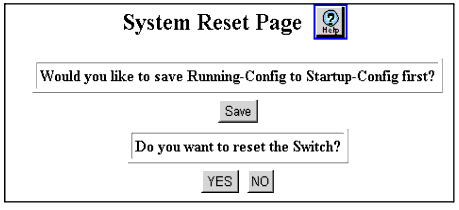

  1. Select Save to save your Running Configuration
    (Running-Config to the startup configuration
    (Startup-Config before performing a system reset.
  2. *Note: If you do not save your Running-Config to Startup-Config before you reset the switch, you will lose all of the modifications you made.

  3. Click YES to reset the switch, or NO to cancel the operation.

Previous page Next page