Web Agent Procedure
To add ports to a hunt group using the Web Agent:
- In the navigation pane, expand the Modules and Ports folder, and then click Configuration. The Module Information Web page is displayed in the content pane. See Figure�6-11.
Figure 6-11. Module Information Web Page
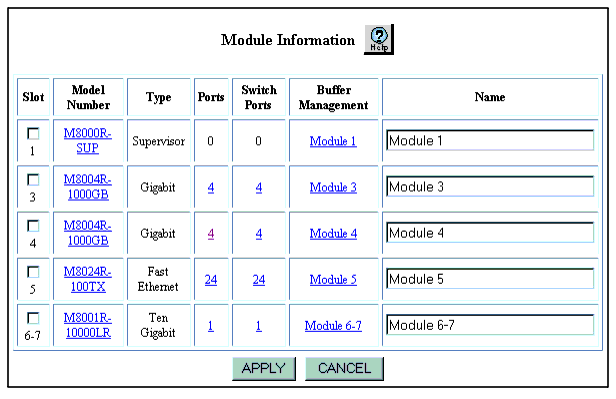
- Select a port number from the Ports column. The Physical Port Configuration Web page is displayed in the content pane. See Figure�6-12.
Figure 6-12. Physical Port Configuration Web Page
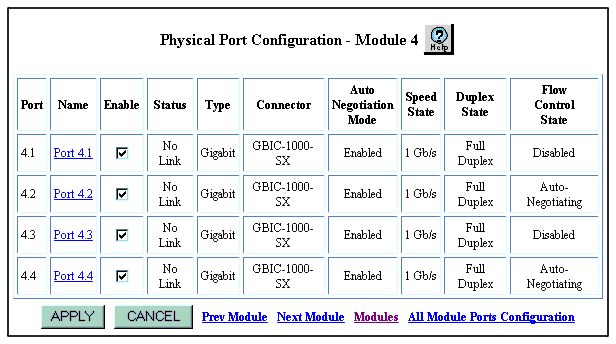
- Uncheck the checkbox from the Enable column for a specific port. The check mark disappears to disable the port.
* Note: Check the speed of the ports that you are configuring into the hunt group. The ports must be physically connected to each other (for example, in a four-port Gigabit hunt group, ensure that you have four fiber cables with switch ports connected at each end).Also Auto-negotiation should be disabled on the ports to further ensure against speed mismatch
- If this is a new hunt group, disable all of the ports you are adding to the hunt group.
- If you are adding ports to an existing hunt group, disable the ports you are adding.
- Click APPLY to save your changes, or CANCEL to restore previous settings.

