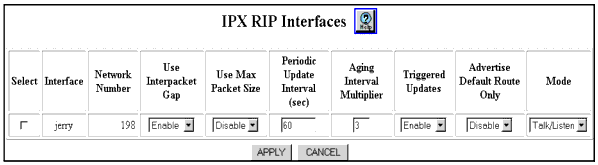
Table 17-1. IPX RIP Interfaces Dialog Box Parameters
| Parameter |
Allows you to... |
| Select |
Select a RIP interface to modify.
NOTE: Note: This field is displayed in the IPX RIP Interface dialog box.
|
| Interface |
Identify the IPX interface associated with the RIP interface. |
| Network Number |
Identify the number of the IPX network associated with the interface. |
| Use Interpacket Gap |
Select Disable if you do not want RIP updates sent out over an interface to have an interpacket transmission delay. The default is Enable. |
| Use Max Packet Size |
Enable or disable the transmission size of RIP packets sent out an interface:
- If enabled, RIP packets can contain the maximum allowed by the MTU of the RIP interface.
- If disabled, RIP packets are limited to 50 network entries.
- The default is Disabled
|
| Periodic Update Interval (sec) |
Specify the length of time for the periodic update interval. The default is 60 sec. |
| Aging Interval Multiplier |
Specify the length of time that information from received RIP updates are kept as a multiplier of the Periodic Update Interval. The default is 3. |
| Triggered Updates |
Select Disable to disallow RIP updates to be immediately transmitted to the network in response to changes in the network topology. The default is Enable. |
| Advertise Default Route Only |
Select Enable to allow the advertising of the default network exclusively (subject to a route to the default network being known to the switch). The default is Disable. |
| Mode |
Select the one of the following modes for the RIP interface:
- Talk/Listen - Send and receive advertisements.
- Talk Only - Send advertisements.
- Listen Only - Receive advertisements.
The default is Talk/Listen |
| |