

|
|
|
Following the planning documentation, you can insert the required Media Modules into their designated bays. The G700 Media Gateway can accommodate up to four Media Modules, or plug-in circuit packs. The choice of Media Modules is dictated by the offer selected by the customer and the configuration of the system.
Consult the planning documentation and the order form to determine which modules you will be installing. The planning documents also indicate into which slots the modules are to be inserted. The Media Modules available at this time are:
For detailed descriptions of the Media Modules see "Avaya MultiVantage Solutions Hardware Guide, 555-233-200".
WARNING: The Avaya G700 Media Gateway must not be operated with any slots open. Failure to cover empty slots with the supplied blank plates can cause overheating due to inadequate air distribution.
CAUTION: The connector pins can be bent or damaged if the module is handled roughly, or if misaligned and then forced into position.
CAUTION: Separate ESD paths to the chassis ground connect to the Media Modules at the spring-loaded captive screws. Ensure the captive screws are securely tightened to prevent damage to the equipment.
Begin _____________________
Figure 11. Insert Media Module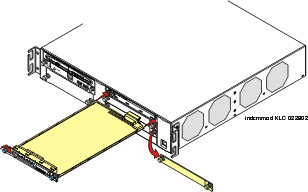
The Media Module connector has different length pins. The long pins will engage first to provide grounding. Medium length and short pins will provide power and signal.
WARNING: To prevent access to electrical hazards by unauthorized personnel and to ensure continued compliance to international radiated emissions requirements, all captive screws must be securely tightened such that they cannot be loosened without the use of a tool.
WARNING: After you have connected telephones to the various Media Modules, be sure to add circuit protection to the lines (See "Complete the Telephone Installation Process" on page�237).
At this point, you have readied the G700 inserted the S8300 if required, and inserted the Media Modules, as described in the planning documentation. Next, if required, the Expansion Module should be inserted into its bay.
|
|
|