|
|
|
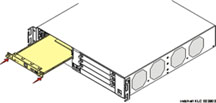
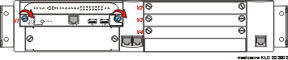
The S8300 Media Server is inserted into the G700 Media Gateway slot #1 (v1), whether it is the primary server or configured as a Local Survivable Processor (LSP). The S8300 can only be inserted in the slot (v1) on the left side of the G700 Media Gateway. The LED module must be pulled from its housing to provide clearance for the S8300 Media Server.
CAUTION: If you are removing an S8300, use the shutdown button to stop the operating system. The OK to Remove LED will flash while the shutdown is in progress and will turn steady green when it is safe to remove the S8300.
Insert the S8300 into Slot #1 of the G700 Media Gateway
Begin _____________________
Figure 7. Clear the left side of the G700 Media Gateway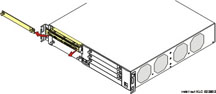
Guide the longer, left side of the LED module into the chassis until the shorter, right edge of the module can engage in its guides.
Figure 9. Align the LED module and the S8300 Media Server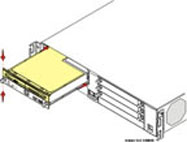
The connector has different length pins. The long pins will engage first to provide grounding. Medium length and short pins will provide power and signal.
WARNING: To prevent access to electrical hazards by unauthorized personnel and to ensure continued compliance to radiated emissions requirements, all captive screws must be securely tightened such that they cannot be loosened without the use of a tool.
|
|
|