

|
|
|
G700 Media Gateways can be mounted in equipment stacks with routers, switches, or other G700s. The stack is limited to ten elements. To link multiple units, each G700 must be equipped with an Avaya X330STK Stacking Module, which is mounted through the rear panel (back view) of the G700.
CAUTION: The Stacking Sub-Module is not hot-swappable. That is, the G700 must be powered off before you insert or remove a Stacking Module. If there is an S8300 present that is also turned on, the S8300 should be shut down first, by pressing the Shutdown button until the OK to Remove LED pn the front faceplate of the S8300 shows a steady green light. Then, the G700 should be powered off.
Insert an Avaya X330STK Stacking Module
Begin _____________________
Figure 12. Insert Stacking Module in G700 (back view)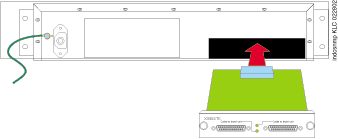
At this point, the required modules and cabling units have been inserted into the G700 Media Gateway. The next step will be to install cabling.
|
|
|